
Shift4Shop is the hosted e-commerce platform that was called 3dcart for more than 20 years. Payments company Shift4 bought 3dcart in November 2020 and renamed it Shift4Shop in January 2021, according to Shift4Shop's own announcement. Many long-running stores still run on it, with years of products, customers, orders and search rankings behind them. When the theme, app choice or pricing stops fitting, Shopify is the usual next step. That is when a Shift4Shop to Shopify migration comes up.
This guide covers what the move involves in 2026: how Shift4Shop's pricing compares with Shopify's, what Shift4Shop's CSV exports give you, why Shopify's free Store Migration app doesn't list Shift4Shop as a source, how product options and Advanced Options map to Shopify variants, what to check about your payment processor and domain, and how to redirect the _p_ and _c_ URLs that hold your rankings. Facts come from Shift4Shop's plan pages and knowledge base and from Shopify's pricing and help pages, checked on November 10, 2026. Prices are in US dollars.
Why merchants leave Shift4Shop for Shopify
When 3dcart became Shift4Shop, it launched a free End-to-End plan for US merchants who process card payments with Shift4. That plan included the features of the old Pro plan, which had cost $229 a month. On November 10, 2026, Shift4Shop's plan page listed one unlimited End-to-End plan at $41 a month and said a monthly fee "may be charged depending on your plan and monthly processing amount". The same page now describes its built-in card processing as "our integrated payment processing solution from PayPal". If you are on an older free or tiered plan, check your current invoice and processor statement before you compare costs. Shift4Shop's End-to-End Payments page still shows a $0 platform fee with Shift4 processing and $229 a month with another provider, so the two pages disagree; get your rate in writing.
Shopify charges a plan fee but lets you choose your payment setup. Here is how the two compare, using Shopify's pricing page.
| Comparison | Shift4Shop | Shopify Basic |
|---|---|---|
| Plan fee | End-to-End plan listed at $41/mo; a fee may apply depending on plan and processing volume | $29/mo billed yearly, or $39 monthly |
| Product limit | Unlimited | Unlimited |
| Staff accounts | Unlimited staff users | Owner account; Grow adds 5 staff, Advanced 15 |
| Platform transaction fee | None (your processor's fees still apply) | None with Shopify Payments; 2% on Basic with a third-party provider |
| Online card rate | Set by the built-in processor or your own gateway | 2.9% + 30¢ with Shopify Payments |
| Variants per product | Advanced Options: up to 200 combinations per product is the supported limit | Up to 3 options and 2,048 variants |
| Default URLs | /Product-Name_p_123.html, /Category-Name_c_7.html or custom file names | /products/handle, /collections/handle |
Shopify Grow is $89 a month billed yearly or $105 monthly. Advanced is $359 yearly or $399 monthly. Shopify Plus starts at $2,300 a month on the public pricing page.
Price is rarely the main reason to move. Shift4Shop includes a lot of built-in features, such as real-time shipping, product Q&A, gift registries and an RMA module. Merchants usually leave for a bigger theme and app ecosystem, a checkout that more shoppers already know, Shopify POS, Markets for selling abroad, B2B tools, or to choose their own payment provider instead of having the plan fee depend on processing. If your store relies on a built-in Shift4Shop feature, list it now and find the Shopify feature or app that replaces it before you commit.
Still deciding whether to move at all? Our Shopify vs Shift4Shop comparison sets out fees, built-in features, variants and which platform fits which store.
What moves from Shift4Shop to Shopify, and what doesn't
Shift4Shop has more CSV exports than most hosted platforms. Products, categories, product options, Advanced Options, bulk pricing and image gallery paths export from Products > Product List > Export/Import, customers from Customers > Customer List > Export/Import, and orders from Orders > Manage Orders > Export/Import, according to Shift4Shop's backup guide. None of these files are in Shopify's format, so they still need reshaping. Shopify's help centre says to import products first, then customers, then historical orders, so each order can attach to the right product and customer.
| Data | How it leaves Shift4Shop | How it gets into Shopify |
|---|---|---|
| Products and prices | Products export (name, price, sale price, stock, descriptions, image paths) | Reshaped Shopify product CSV, or a migration app |
| Options and variants | Product Options and Advanced Options exports | Variant rows under one handle, with final price, SKU and stock |
| Categories | Categories export; product rows list their categories | Rebuilt as collections (manual or automated) |
| Customers | Customers export (default or all fields), plus reward points and store credits | Shopify customer CSV import; balances moved by app or as gift cards |
| Customer passwords | Not exportable | Shopify customer accounts sign in with an emailed one-time code |
| Orders | Orders export, with order items if you tick the box | Migration app (Shopify's CSV import does not create orders) |
| 301 redirects | Exportable as CSV from the SEO tools | Merged into your Shopify URL redirect list |
| Reviews, blog, content pages | Varies; often copied or moved by a migration app | Review app import, Shopify blog posts and pages |
Customer passwords don't carry over from Shift4Shop on any route. That matters less than it used to, because Shopify's current customer accounts sign in with a one-time code sent by email, so nobody has to choose a new password. Still email customers about the move, because saved carts, wish lists and gift registries will not move on their own.
Get your data out of Shift4Shop
Run the exports in this order, and keep the original files untouched as a backup.
- Products: Products > Product List > Export/Import, expand Products and click Export Data. The file has
catalogid(Shift4Shop's internal database ID),id(your SKU),name,price,price2(MSRP),saleprice,onsale,stock,description,extended_description,keywordsand image columns, as listed in the product export guide. Choose the option that exports all fields, so you keep meta titles, custom file names and custom fields. - Options: export Product Options and Advanced Options separately from the same page. Advanced Options is the file with each combination's own code, stock, weight and cost.
- Images: the main export only holds paths to each product's first four images, such as
assets/images/image1.jpg. Export Image Gallery paths for the rest, and download theassets/imagesfolder over your store's FTP access as a backup. - Customers and orders: export customers with all fields, plus reward points and store credits if you use them. Export orders with Include Order Items ticked. The newer Orders Hub export button only exports the screen you are looking at, so use Export/Import for full records.
- Redirects: export your existing 301 redirects from Marketing > SEO Tools. These stop working when your domain leaves Shift4Shop, as explained in the SEO section below.
- Large stores: exports run in the background. Use the Import/Export Status page or Notify Me to download big files, and the Schedule option to re-export new orders and customers just before launch.
Option 1: Map Shift4Shop's CSVs to Shopify's product CSV
For catalogs up to a few hundred products, reshaping the exports yourself gives you the cleanest result. Rebuild them to match Shopify's product CSV and import under Products > Import.
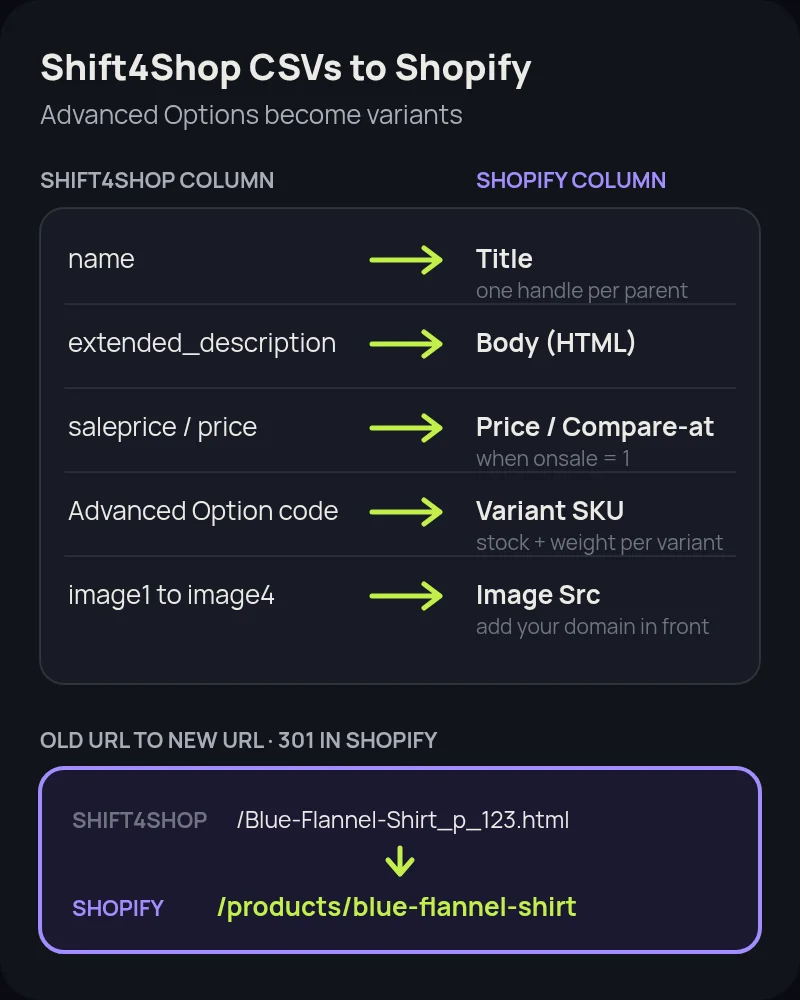
- Handle: use the product's custom file name without
.htmlwhere it has one, or a cleaned version of the name. Handles can only contain letters, numbers and hyphens, and every variant row must repeat the parent's handle. - Title and description:
namebecomes Title.extended_descriptionis the main product description and becomes Body (HTML). Shift4Shop's shortdescriptiononly shows on search pages by default, so use it for an excerpt metafield or drop it. - Prices: if
onsaleis 1, putsalepricein Variant Price andpricein Variant Compare At Price. If the product is not on sale, useprice, and decide whetherprice2(MSRP) should become the compare-at price. Compare-at prices that are higher than the selling price display as a sale on most Shopify themes. - Options and variants: on Shift4Shop, plain options are labels on one product. Advanced Options turn each combination into its own item with a code, stock, weight and cost, as described in Shift4Shop's Advanced Options guide. Each Advanced Option becomes one Shopify variant row. Use the Advanced Option code as Variant SKU, its stock as inventory, and base price plus each option's price change as the final Variant Price.
- Weights: an Advanced Option's weight is added to the product's base weight on Shift4Shop. Shopify stores one weight per variant, so add the two together before import or shipping rates will be wrong.
- Limits: Shopify allows 3 options and 2,048 variants per product, per Shopify's developer changelog. A Shift4Shop product with four or more option sets needs to be split into several products or have two options combined.
- Non-variant options: only dropdown, radio and image options can become Advanced Options on Shift4Shop. Text boxes, checkboxes and file uploads are not variants on Shopify either, so plan a product options app or line item properties for them.
- Images:
thumbnailandimage1toimage4are relative paths. Add your store domain in front, for examplehttps://www.yourstore.com/assets/images/image1.jpg, so Shopify can fetch each file while the old store is still live. - Bulk pricing and customer groups: quantity discounts and group prices don't fit the product CSV. Rebuild them with Shopify discounts, B2B catalogs or a wholesale app.
Test the import on 10 products, including one with Advanced Options, one on sale and one with text inputs. Check the result in the Shopify admin and on the storefront before you import the rest.
Option 2: Use a migration app
Shopify's free Store Migration app lists Square, WooCommerce, Etsy, Wix, Amazon, eBay, Clover and Lightspeed R/X (Vend) as sources. Shift4Shop is not on that list. For larger catalogs, order history or many Advanced Options, third-party services such as Cart2Cart and LitExtension list Shift4Shop as a source and Shopify as a target. Both offer a free demo migration on a limited number of records before you pay.
- Run the demo first. Check a product with Advanced Options, a product on sale, a customer with several orders and a product with a text input.
- Ask how it reads your store. Some services connect to the Shift4Shop API with keys you create, and others ask for exported CSV files. Either way, keep the store open until the full migration is checked.
- Ask what happens to URLs. Redirect creation is often a paid option. Check that it covers
_p_and_c_URLs, custom file names, content pages and blog posts. - Plan a recent-data top-up. Run the full migration, keep Shift4Shop open during testing, then move new orders and customers just before launch.
Check your payment processor and domain first
This is the part most Shift4Shop guides skip, and it can hold up a launch by weeks.
- Payments: on the End-to-End plan, your store's card processing is built into Shift4Shop. On Shopify you will set up Shopify Payments or another provider, which means a new merchant account and new payouts. Keep the old processing account open until refunds and chargebacks on Shift4Shop orders have run their course.
- Domain: Shift4Shop offers to register and renew a domain for free. If it registered yours, make sure you can log in to the registrar, unlock the domain and get the transfer code, or that you can at least change its DNS records. Do this before you book a launch date.
- Email: if your email runs on the same domain, copy its MX, SPF and DKIM records before you change DNS, so mail keeps flowing after the switch.
Protect your search traffic with redirects
Shift4Shop URLs come in a few shapes, and nearly every one changes on Shopify:
- Generated product URLs such as
/Blue-Flannel-Shirt_p_123.html, built from the product name and catalog ID, as shown in Shift4Shop's URL help. Map each to/products/blue-flannel-shirt. The number in the URL is thecatalogidin your product export, so you can match every URL to a product with a lookup instead of by hand. - Generated category URLs such as
/Mens-Shirts_c_7.html. Map each to its new/collections/page. - Custom file names such as
/sweater.html, set under a product's Meta Tags tab, per the custom file name guide. Newer stores create lowercase, hyphenated custom URLs automatically. Map these one to one as well. - Content pages, manufacturer pages and blog posts, which also use custom file names. Map them to Shopify pages, collections and blog posts.
Shift4Shop's built-in 301 redirect tool only works for traffic that reaches your Shift4Shop store, so every redirect in it stops the moment your domain points to Shopify. Export that list, and send each old URL straight to its final Shopify URL instead of through a chain. Add everything under Content > Menus > View URL redirects in Shopify, or import it as a CSV. Paths that end in .html redirect fine, because they don't exist on Shopify.
Before launch, pull 12 months of landing pages from Search Console and analytics so you know which product, category and blog URLs earn traffic. After launch, submit the Shopify sitemap, test a sample of old URLs and watch Search Console for 404s. Our Shopify migration SEO checklist covers the full process.
Shift4Shop to Shopify migration, step by step
- Audit the store. Product and Advanced Option counts, option types, customer groups, bulk pricing, built-in modules you rely on, apps and sales channels.
- Check payments and domain. Confirm who controls the domain and plan the new payment provider.
- Export and crawl. Export products, options, Advanced Options, categories, image gallery paths, customers, orders and 301 redirects. Crawl the site and export 12 months of landing pages.
- Choose plan and theme. Pick the Shopify plan and theme, and list the apps that replace Shift4Shop's built-in features.
- Map data. Join products, options and Advanced Options into variant rows with final prices, compare-at prices, combined weights and SKUs.
- Import products, then customers, then orders. Check samples after each step.
- Rebuild collections, navigation, pages and blog. Turn categories into collections and move content pages and posts.
- Set up payments, tax and shipping. Test checkout with real orders and refunds.
- Load redirects. Import every mapped
_p_,_c_, custom file name and old redirect, with no chains. - Launch and verify. Point the domain, reconnect Google and Meta channels, submit the sitemap, test old URLs, then cancel Shift4Shop only after images and data are confirmed in Shopify.
How long a Shift4Shop migration takes
A store with up to a few hundred products and simple options can move in about two weeks. Stores with thousands of products, Advanced Options, customer groups and years of orders usually need four to six weeks. Stores that also need a new payment provider approved, a domain transfer, or a rebuilt wholesale setup can take eight weeks or more, mostly because of data checks, approvals and redirect mapping rather than the import itself.
Common mistakes to avoid
- Exporting only the main product file and losing every Advanced Option code, stock level and weight.
- Importing list prices for products on sale, so every sale price disappears on launch day.
- Cancelling Shift4Shop before images are in Shopify. Image paths point to your old store.
- Assuming the old 301 redirects keep working. They live on Shift4Shop and stop when DNS moves.
- Finding out on launch day that Shift4Shop registered the domain and nobody has the login.
- Forgetting built-in features such as gift registries, product Q&A, reward points and RMA, which need a Shopify app or a new process.
How Startup Slang helps
We have moved brands to Shopify from Magento, WooCommerce, BigCommerce and Salesforce Commerce Cloud, and our Volusion, Ecwid, OpenCart, PrestaShop, Wix, Squarespace, Etsy and Square guides cover other starting points. A Shift4Shop move centres on turning Advanced Options into clean Shopify variants, keeping sale prices and weights right, sorting out payments and the domain early, and redirecting every _p_ and _c_ URL. Our Shopify migration team handles the data, redirects, theme and apps from our offices in Toronto and Montreal. If you are still choosing a platform, our Shopify agency team can help you pick a plan and a build approach.
Frequently asked questions
Does Shopify's Store Migration app support Shift4Shop?
No. Shopify's Store Migration app lists Square, WooCommerce, Etsy, Wix, Amazon, eBay, Clover and Lightspeed R/X (Vend) as sources, and Shift4Shop (formerly 3dcart) is not on that list. Reshape Shift4Shop's CSV exports to Shopify's product CSV template, or use a third-party migration service such as Cart2Cart or LitExtension, which both list Shift4Shop as a source.
How do I export products from Shift4Shop?
Go to Products > Product List and click Export/Import. Expand Products and click Export Data for the main file, then export Product Options, Advanced Options, Categories and Image Gallery paths from the same page. Customers export from Customers > Customer List > Export/Import, and orders from Orders > Manage Orders > Export/Import with Include Order Items ticked.
What happens to Shift4Shop Advanced Options on Shopify?
Each Advanced Option combination becomes one Shopify variant under a single product handle. Use the Advanced Option code as the variant SKU, its stock as inventory, and add its extra weight to the base product weight. Shopify allows up to 3 options and 2,048 variants per product, so products with four or more option sets need to be split or have options combined.
Will Shift4Shop customer passwords move to Shopify?
No. Shift4Shop does not export customer passwords, so no migration method can move them. Shopify's current customer accounts sign in with a one-time code sent by email, so customers do not need to create a new password. Import customers and email them about the move before launch.
Do my Shift4Shop 301 redirects keep working after I move?
No. Shift4Shop's redirect tool only works while your domain points to your Shift4Shop store, so those redirects stop when DNS moves to Shopify. Export the list, point each old URL straight to its final Shopify URL, and add those redirects in Shopify together with your _p_, _c_ and custom file name URLs.
Is Shopify more expensive than Shift4Shop?
It depends on your plan. On November 10, 2026, Shift4Shop listed its unlimited End-to-End plan at $41 a month and said a monthly fee may apply depending on your plan and processing volume. Shopify Basic is $29 a month billed yearly or $39 monthly, with 2.9% + 30¢ online card rates on Shopify Payments. Compare payment fees, apps and staff needs, not only the plan price.
How long does a Shift4Shop to Shopify migration take?
A store with up to a few hundred products and simple options can move in about two weeks. Stores with thousands of products, Advanced Options, customer groups and years of orders usually need four to six weeks. A new payment provider approval, a domain transfer or a rebuilt wholesale setup can push it to eight weeks or more.