
Ecwid is a hosted e-commerce platform owned by Lightspeed. Its big selling point has always been flexibility: you can drop an Ecwid store into an existing WordPress, Wix or Squarespace site, sell on its own Instant Site, or do both at once from a single catalog. Many brands start that way, and when the catalog, team and marketing outgrow a store embedded in another website, they look at Shopify. That is when an Ecwid to Shopify migration comes up.
This guide covers what the move involves in 2026: how Ecwid's plans compare with Shopify's, what Ecwid's CSV export does and doesn't give you, why Shopify's free Store Migration app doesn't list Ecwid as a source, how Ecwid options and variations map to Shopify variants, what to do with the website your store is embedded in, and how to handle the URLs that matter most for SEO, including old #!/ hashbang links. Facts come from Ecwid's pricing page and help centre and from Shopify's pricing and help pages, checked in November 2026. Prices below are in US dollars and vary by country, so check your local pricing page.
Why sellers leave Ecwid for Shopify
Ecwid's US pricing on November 9, 2026 had four plans: Starter at $5 a month for up to 10 products, Venture at $29 a month billed yearly ($35 monthly) for up to 100 products, Business at $49 yearly ($65 monthly) for up to 2,500 products, and Unlimited at $119 yearly ($149 monthly), according to Ecwid's pricing page. Ecwid charges no transaction fees of its own, but product caps, two staff accounts on Business, and features such as custom URL slugs that only start on the Business plan push growing stores up the ladder.
Shopify bundles the online store, hosting, SSL and checkout into every plan, with no product cap. Here is how the two line up using Shopify's pricing page.
| Comparison | Ecwid | Shopify Basic |
|---|---|---|
| Plan fee | $5 to $119/mo billed yearly ($5 to $149 monthly) | $29/mo billed yearly, or $39 monthly |
| Product limit | 10, 100, 2,500 or unlimited, depending on plan | Unlimited |
| Staff accounts | None below Business, 2 on Business, unlimited on Unlimited | Owner account; Grow adds up to 5 staff |
| Platform transaction fee | None from Ecwid (your payment provider still charges) | None with Shopify Payments; 2% on Basic with a third-party provider |
| Online card rate | Depends on the provider (Lightspeed Payments, Stripe, PayPal and others) | 2.9% + 30¢ with Shopify Payments |
| Custom URL slugs | Business plan and up | Every plan (/products/, /collections/) |
| Where the store lives | Instant Site, or embedded in another site builder | Shopify online store (or Buy Button / headless) |
Shopify Grow is $89 a month billed yearly or $105 monthly. Advanced is $359 yearly or $399 monthly. Shopify Plus starts at $2,300 a month on the public pricing page.
Price is rarely the only reason. Sellers usually move for a bigger theme and app ecosystem, deeper reporting, Markets for international selling, Shopify POS, B2B features and one platform for both the website and the store instead of a site builder plus an embedded widget. Ecwid still fits small catalogs that want to sell inside an existing website for very little money. Once the plan limits, the split between site builder and store, or app gaps start costing sales, Shopify is a common next step.
What moves from Ecwid to Shopify, and what doesn't
Ecwid is friendlier to export than many platforms. Catalog > Data Import & Export > Export Catalog downloads products and categories as a CSV, and the same page has Export All Orders and Export All Customers, according to Ecwid's export guide. The catch is that Ecwid's CSV uses its own structure, so it still has to be reshaped for Shopify. Shopify's help centre says to import products first, then customers, then historical orders, so each order can attach to the right product and customer.
| Data | How it leaves Ecwid | How it gets into Shopify |
|---|---|---|
| Products, options and variations | Export Catalog CSV (product, option and variation rows) | Reshaped Shopify product CSV, or a migration app |
| Categories | Same catalog CSV (category rows) | Rebuilt as collections (manual or automated) |
| Customers | Export All Customers | Shopify customer CSV import |
| Orders | Export All Orders | Migration app (Shopify's CSV import does not create orders) |
| Customer logins | Ecwid uses one-time email codes or links by default | Shopify customer accounts sign in with a one-time code |
| Instant Site redirects | Exportable from the same page | Merge into your Shopify URL redirect list |
| Reviews, gift cards, discounts, subscriptions | Gift cards export; others vary | Usually rebuilt or moved with a dedicated app |
Customer passwords are less of a problem than on most platforms. Ecwid's customer accounts sign in with a one-time access code or sign-in link sent by email unless the store asked support to turn on legacy password login. Shopify's current customer accounts also use an emailed one-time code, so most shoppers keep signing in the same way. Still tell customers about the move, because any saved favourites, wish lists or member discounts will not carry over on their own.
Get your data out of Ecwid
Do the export in this order and keep the original files untouched as a backup.
- Full catalog: Catalog > Data Import & Export > Export Catalog. Each row has a
typecolumn. Rows markedproducthold the product,product_optionrows hold each option value,product_variationrows hold each combination, andcategoryrows hold your categories, as described in Ecwid's CSV format guidelines. - Older stores: stores that signed up before May 24, 2023 may still have the legacy product export, which does not export variations. Switch to the new format under Settings > What's New or ask Ecwid support first, or you will lose every variation's SKU, price and stock.
- Customers and orders: Export All Customers and Export All Orders from the same page.
- Images: the catalog CSV contains image URLs on Ecwid's servers. They work for an import while your Ecwid account is active, so import before you cancel the plan, and keep a local copy.
- Multilingual stores: the legacy export only covers the main store language. Export or document translations separately before you plan Shopify Markets and Translate & Adapt.
- Delimiter check: if your price format uses a comma as the decimal separator, Ecwid exports with a semicolon delimiter. Convert it before you open the file in a Shopify template.
Option 1: Map Ecwid's CSV to Shopify's product CSV
For catalogs up to a few hundred products, reshaping the export yourself gives you the cleanest result. Rebuild it to match Shopify's product CSV and import it under Products > Import.
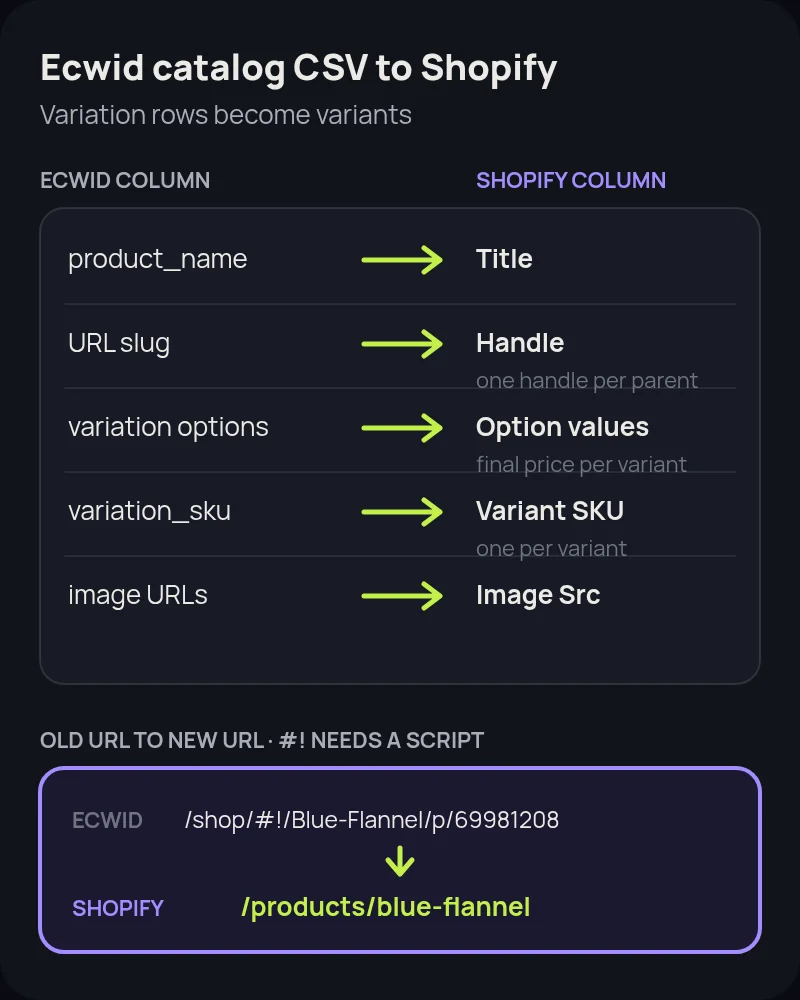
- Handle: use the product's current Ecwid URL slug where you can, so the new
/products/path still matches the old name. Handles can only contain letters, numbers and hyphens, and every variant row must repeat the parent's handle. - Title and description:
product_namebecomes Title, and the product description becomes Body (HTML). - Options and variations: each Ecwid
product_variationrow becomes one Shopify variant row. Theproduct_variation_option_Sizeandproduct_variation_option_Colorstyle columns become Option1 and Option2 names and values. Shopify allows three options and up to 2,048 variants per product. - Price modifiers: Ecwid options can raise the price by a fixed amount or a percentage. If a variation row has its own price, use it. If not, calculate base price plus the modifier and put the final number in Variant Price.
- Inputs that are not variants: text fields, checkboxes, date pickers and file uploads don't create variants. Rebuild them with a product options app or line item properties in your theme.
- SKU and stock:
product_variation_skubecomes Variant SKU. Format the SKU column as text so spreadsheets don't strip leading zeros. Variation stock becomes Variant Inventory Qty for the right location. - Weight, SEO and status: carry over weight for shipping rates, SEO title and description, and draft or active status. Import as Draft first if you want to review before anything goes live.
Categories don't import through the product CSV. Rebuild them as collections, and use automated collections with product tags or types where an Ecwid category followed a clear rule.
Option 2: Use a migration app
Shopify's free Store Migration app lists Square, WooCommerce, Etsy, Wix, Amazon, eBay, Clover and Lightspeed R/X (Vend) as sources. Ecwid is not on that list, even though Lightspeed owns it. For larger catalogs, order history or many variations, a third-party service such as Cart2Cart or LitExtension can read Ecwid data and write it into Shopify, usually with a free demo migration of a limited number of records.
- Run the demo first and check a product with variations, a customer with several orders and a product with input fields.
- Ask what happens to URLs. Some services offer redirect creation as a paid option. Check whether it covers clean URLs, ID-based URLs and hashbang URLs, which need different handling.
- Plan a recent-data top-up. Run the full migration, keep Ecwid open during testing, then move new orders and customers just before launch.
If your Ecwid store is embedded in another website
This is the decision most Ecwid guides skip. If your store sits inside a WordPress, Wix or Squarespace site, you have two clean options.
- Move everything to Shopify. Rebuild pages and blog posts on Shopify, move the domain, and redirect old page and store URLs. You end up with one platform, one checkout and one analytics setup. Our Wix and Squarespace guides cover the website side.
- Keep the site and swap the store. Keep your WordPress or site-builder content and sell through Shopify's Buy Button sales channel or a store on a
shop.subdomain. This is faster, but you split content and commerce across two platforms again, so it suits content-heavy brands that sell a few products.
Either way, list every page that shows Ecwid products or the cart, because each one needs a new link or a redirect.
Protect your search traffic with redirects
Ecwid URLs come in three shapes, according to Ecwid's URL documentation and its SEO help page, and each needs different handling:
- Clean URLs such as
/shop/blue-flannelor/blue-flannel. Map them one to one to/products/blue-flanneland add them under Content > Menus > View URL redirects, or import them as a CSV. - ID URLs such as
/Blue-Flannel-p69981208on Instant Sites created before June 17, 2024. Map them the same way. Your catalog export has theproduct_internal_idto match each one. - Hashbang URLs such as
/shop/#!/Blue-Flannel/p/69981208on embedded stores without clean URLs. Everything after#never reaches the server, so neither Shopify nor your old host can 301 it. Redirect/shopitself to your main collection, and if Search Console or backlinks show these URLs still bring traffic, add a small theme script that reads the old fragment and sends the visitor to the new product page.
Before launch, pull 12 months of landing pages from Search Console and analytics so you know which product and category URLs earn traffic. After launch, submit the Shopify sitemap, test a sample of old URLs and watch Search Console for 404s. Our Shopify migration SEO checklist covers the full process.
Ecwid to Shopify migration, step by step
- Audit the store. Plan, product and variation counts, option types, languages, sales channels (Instant Site, embedded sites, marketplaces, social) and apps.
- Export and crawl. Export the catalog, customers, orders, gift cards and Instant Site redirects. Crawl the site and export 12 months of landing pages.
- Choose plan, theme and site setup. Decide whether the whole website moves to Shopify or only the store.
- Map data. Rebuild variation rows as Shopify variants with final prices, text SKUs and stock per location.
- Import products, then customers, then orders. Check samples after each step.
- Rebuild collections, navigation and pages. Turn categories into collections and move content pages and blog posts if the site moves too.
- Replace apps and features. Reviews, subscriptions, wholesale pricing groups, product inputs and marketplace sync.
- Set up payments, tax and shipping. Test checkout with real orders and refunds.
- Load redirects. Import every mapped clean and ID-based URL, and plan the hashbang fallback.
- Launch and verify. Point the domain, reconnect Google and Meta channels, submit the sitemap, test old URLs, then cancel Ecwid only after images and data are confirmed in Shopify.
How long an Ecwid migration takes
A store on Starter or Venture with up to 100 products and simple options can move in about one to two weeks. Business-plan stores with hundreds to 2,500 products, variations and an embedded website usually need three to five weeks. Unlimited-plan catalogs with several languages, wholesale groups, subscriptions or marketplace sync can take six weeks or more, mostly because of data checks and redirect mapping rather than the import itself.
Common mistakes to avoid
- Exporting with the legacy format and losing every variation.
- Cancelling Ecwid before images are in Shopify. CSV image URLs point to Ecwid's servers.
- Ignoring hashbang URLs because they can't be redirected the usual way.
- Forgetting the host website. Old store pages on WordPress or Wix keep showing a dead widget unless you update or redirect them.
- Losing leading zeros in SKUs when a spreadsheet treats them as numbers.
- Missing marketplace and social listings that were synced from Ecwid's catalog.
How Startup Slang helps
We have moved brands to Shopify from Magento, WooCommerce, BigCommerce and Salesforce Commerce Cloud, and our OpenCart, PrestaShop, Volusion, Shift4Shop, Wix, Squarespace, Etsy and Square guides cover other starting points. An Ecwid move centres on turning variation rows into clean Shopify variants, deciding what happens to the website the store lived in, and handling three kinds of old URL. Our Shopify migration team handles the data, redirects, theme and apps from our offices in Toronto and Montreal. If you are still choosing a platform, our Shopify agency team can help you pick a plan and a build approach.
Frequently asked questions
Does Shopify's Store Migration app support Ecwid?
No. Shopify's Store Migration app lists Square, WooCommerce, Etsy, Wix, Amazon, eBay, Clover and Lightspeed R/X (Vend) as sources. Ecwid is not on that list, even though Lightspeed owns Ecwid. Reshape Ecwid's catalog CSV to Shopify's product CSV template or use a third-party migration app such as Cart2Cart or LitExtension.
How do I export products from Ecwid?
In the Ecwid admin go to Catalog > Data Import & Export and click Export Catalog. The CSV has a type column with product, product_option, product_variation and category rows. The same page exports all customers, all orders, gift cards and Instant Site redirects. Stores that signed up before May 24, 2023 may have the legacy export, which does not include variations, so switch formats first.
What happens to Ecwid options and variations on Shopify?
Each Ecwid variation becomes a Shopify variant under one product handle, with up to three options and 2,048 variants per product. Use the variation's own price and SKU, or calculate base price plus the option's price modifier. Text fields, checkboxes, date pickers and file uploads are not variants and need a product options app or line item properties.
Will Ecwid customers need new passwords on Shopify?
Usually not. Ecwid customer accounts sign in with a one-time code or link sent by email unless the store enabled legacy password login, and Shopify's current customer accounts also sign in with an emailed one-time code. Import customers, then tell them about the move before launch.
Can I redirect Ecwid hashbang URLs to Shopify?
Not with a normal 301. In a URL like /shop/#!/Blue-Flannel/p/69981208, everything after the # stays in the browser and never reaches the server. Redirect /shop to a main collection, and if those URLs still bring traffic, add a small theme script that reads the old fragment and sends visitors to the matching product page. Clean and ID-based Ecwid URLs can be mapped with standard Shopify URL redirects.
Is Shopify more expensive than Ecwid?
Often a little, but not always. Ecwid runs from $5 to $119 a month billed yearly with product caps of 10, 100 and 2,500 below Unlimited. Shopify Basic is $29 a month billed yearly or $39 monthly with no product cap. Compare payment fees, apps and staff accounts, not only the plan price.
How long does an Ecwid to Shopify migration take?
A small store with up to 100 products and simple options can move in about one to two weeks. Stores with hundreds to 2,500 products, variations and an embedded website usually need three to five weeks. Multi-language catalogs with wholesale groups, subscriptions or marketplace sync can take six weeks or more.