
BigCommerce is a capable platform. We build on it ourselves, and for some catalogs it is still the right home. But every year we talk to BigCommerce merchants who want Shopify's checkout, its app ecosystem and a platform their marketing team can run without a developer on call. If that is you, the good news is that a BigCommerce store moves to Shopify more cleanly than most platforms. The risks are in the details: product options, custom fields, customer groups and, above all, URLs.
This guide is the plan we follow. It covers when a move makes sense, how the two platforms' 2026 pricing really compares, what maps cleanly and what needs rework, how to build the redirect map, and the order of steps that protects sales and search rankings. Every limit and price below comes from BigCommerce's and Shopify's own pricing pages and help centres, checked in October 2026.
Why brands move from BigCommerce to Shopify
Price is rarely the deciding factor any more, because the two platforms now charge the same monthly fees for their self-serve plans. The reasons we hear most are about how the business runs day to day:
- Apps and integrations. Most marketing, subscription, loyalty and reviews tools build for Shopify first, so the integration your team wants usually already exists.
- Checkout and payments. Shopify Checkout, Shop Pay and Shopify Payments come as one system, and the checkout is the same one millions of shoppers already know.
- Ease of use. Marketing and merchandising teams can launch pages, collections and campaigns without a developer.
- Sales-based plan upgrades. BigCommerce moves you to a higher plan as your trailing 12-month sales grow. Shopify plans are not tied to your sales volume.
BigCommerce vs Shopify pricing in 2026
Here are the published US prices from BigCommerce's pricing page and Shopify's pricing page as of October 31, 2026:
| Tier | BigCommerce (monthly / billed yearly) | Shopify (monthly / billed yearly) |
|---|---|---|
| Entry | Core: $39 / $29. Up to $30K trailing 12-month GMV, then auto-upgrades to Growth | Basic: $39 / $29. No sales cap |
| Mid | Growth: $105 / $79. Up to $100K GMV, then auto-upgrades to Scale | Grow: $105 / $79. No sales cap |
| Upper | Scale: $399 / $299. Covers $33,333 GMV a month, 0.9% on GMV above that; moves to Performance at $2M GMV | Advanced: $399 / $299. No sales cap |
| Enterprise | Performance: custom, from $1,499 a month billed yearly | Plus: from $2,300 a month |
| Third-party payments | A monthly fee on orders through "Open Payment Providers"; none through BigCommerce's Embedded Payment Providers | 2% / 1% / 0.6% / 0.2% (Basic to Plus) when you don't use Shopify Payments |
Two things stand out. First, a growing BigCommerce store on Scale pays 0.9% of GMV above $33,333 a month, so a store with $1M a year in GMV (about $83,333 a month) pays roughly $450 a month in overage on top of the plan fee. BigCommerce calculates GMV as gross order value minus 10%, so your own figure will differ from your sales reports. Second, payment costs depend on your provider on both platforms, so compare total cost with your real order volume and gateway, not sticker prices.
What maps cleanly, and what doesn't
Most core data moves well. The work is in features that BigCommerce models differently from Shopify:
| BigCommerce | Shopify | What to plan for |
|---|---|---|
| Products | Products | Titles, descriptions, images, SKUs, prices and weights map directly. |
| Variant options (up to 600 SKUs per product, 250 values per option) | Variants (up to 2,048 per product, 3 options) | Products with 4 or more variant options must be restructured. |
| Modifier options (text fields, checkboxes, add-ons) | Line item properties or a product options app | Modifiers have no SKU, so they don't become variants. |
| Custom fields (up to 200 per product) | Metafields | Define metafield types first so filters and themes can use them. |
| Categories (up to 8 levels deep) | Collections plus navigation menus | Shopify collections are flat; menus rebuild the hierarchy. |
| Brands | Vendor field, metaobjects or brand collections | Brand pages that rank need their own collection and redirect. |
| Customer groups and price lists | Shopify B2B: companies and catalogs | Up to 3 B2B catalogs on Basic, Grow and Advanced; unlimited on Plus. |
| Customers | Customers | Passwords can't move. Shopify customer accounts sign in with a one-time code. |
| Orders | Historical orders | Needs a migration app or the API, not a CSV. |
| Gift certificates | Gift cards | Migrate balances with an app or the GiftCard API. |
| Web pages and blog posts | Pages and blog articles | Small sites can copy and paste; larger ones use an app. |
| 301 redirects | URL redirects (CSV import) | Update old redirects so they point at the final Shopify URL. |
Shopify's Help Center has dedicated migration guides for platforms such as Wix, Squarespace and WooCommerce, but none for BigCommerce as of October 2026. BigCommerce stores move with CSV exports and imports, a migration app from the Shopify App Store, or custom scripts using both platforms' APIs. For anything above a few hundred products we use an app or scripts, because they carry orders, gift cards and relationships between records that CSVs can't.
Options, modifiers and custom fields
This is where BigCommerce migrations most often go wrong, because the catalog looks fine in an export and only breaks on the product page.
- Variant options. Shopify allows up to 2,048 variants and 3 options per product, according to Shopify's Help Center. BigCommerce allows up to 600 SKUs per product. A product with size, colour, finish and voltage must be split into separate products, grouped, or given an options app. On Shopify Plus, the Combined Listings app can also join separate products into one listing.
- Modifiers. BigCommerce modifiers such as engraving text, gift wrap or add-on checkboxes have no SKU. In Shopify they become line item properties in the theme or fields in a product options app. Check how the order shows them, because your warehouse needs to see them.
- Custom fields. BigCommerce custom fields are simple name and value pairs. Map each one to a typed Shopify metafield, such as text, number, dimension or a reference, so you can use them in filters and templates.
- Bulk pricing rules. BigCommerce supports up to 50 bulk pricing rules per product. On Shopify, wholesale tiers usually move to B2B catalogs, and retail tiered discounts move to automatic discounts or an app.
Build the URL map before anything else
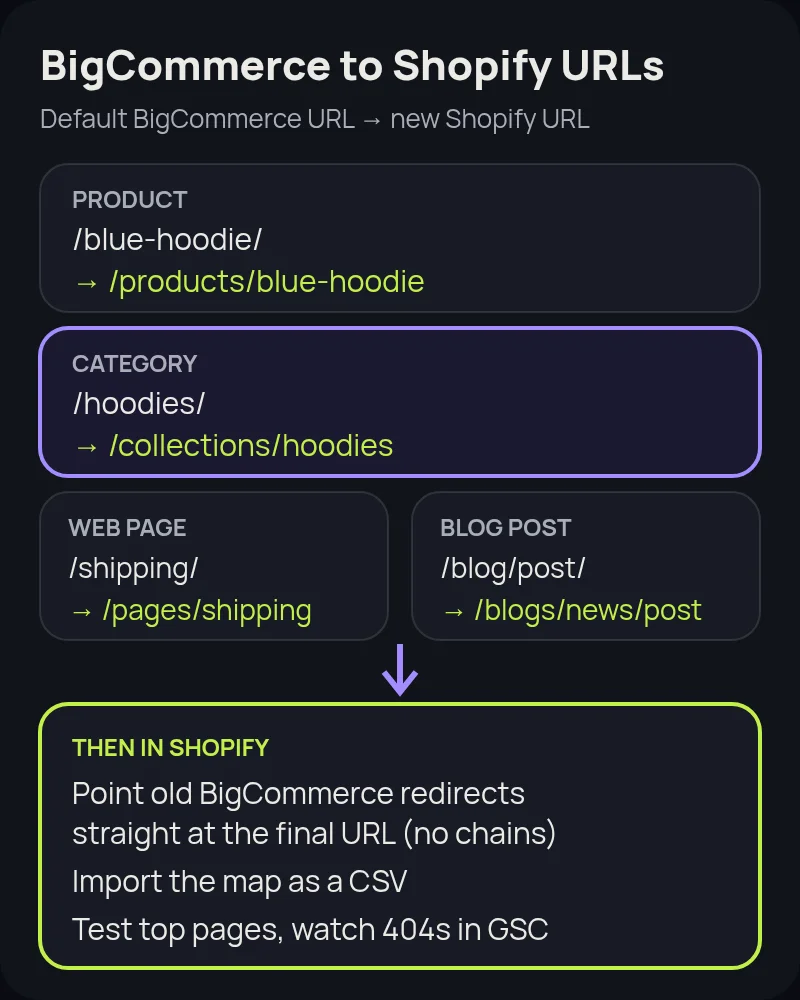
BigCommerce's default "SEO Optimized (Short)" setting puts products and categories at the root of the domain, for example /blue-hoodie/ and /hoodies/. Shopify uses fixed prefixes: /products/, /collections/, /pages/ and /blogs/. That means almost every product and category URL changes, so the redirect map is the most important SEO task in the project.
- Crawl the live store and export every product, category, brand, web page and blog URL.
- Export your existing BigCommerce redirects in Settings › 301 Redirects › Export All. Older redirects still bring in links and traffic.
- Pull your top pages and links from Google Search Console so the pages that earn traffic get checked by hand.
- Map each old URL to one new URL, including trailing-slash and uppercase versions, and rewrite old redirects so they point straight at the final Shopify URL instead of chaining.
- Import the map as a CSV in Shopify (Content › Menus › View URL redirects) before you switch the domain. Shopify redirects only run when the old URL would otherwise return a 404.
Our Shopify migration SEO checklist covers metadata, structured data and the launch-day checks in more detail.
BigCommerce to Shopify migration, step by step
- Audit. List every app, integration, custom field, option set, customer group and script on the BigCommerce store, and decide what moves, what gets replaced and what retires.
- Design the Shopify data model. Plan products and options, metafields, collections, menus and B2B catalogs before you import anything.
- Build the theme. Start from a strong Online Store 2.0 theme or a custom one. If you need a fully custom frontend, read our guide to headless Shopify first.
- Import in order. Shopify recommends importing products first, then customers, then historical orders, so orders link to the right products and customers. Turn off new order notifications while importing orders, or your staff get an email for each one.
- Replace apps and integrations. Connect your ERP, shipping, tax, reviews, email and subscription tools, and use Shopify Flow for the back-office automations BigCommerce handled with scripts or apps.
- Import redirects and test. Place test orders, check taxes and shipping for every region you sell to, and click through your top 100 old URLs.
- Launch. Disconnect the domain from BigCommerce, connect it to Shopify, submit the new sitemap in Search Console and watch 404s, rankings and conversion rate daily for the first few weeks.
If you sell B2B on BigCommerce
BigCommerce's B2B Edition is mature and popular with distributors. Shopify's native B2B now runs on every plan, with company profiles, catalogs with custom pricing, payment terms and quantity rules. Basic, Grow and Advanced include up to 3 B2B catalogs; Plus has unlimited catalogs. If you rely on quotes, sales-rep portals or complex ERP pricing, map each workflow before you commit. Our guide to Shopify B2B explains what is included on each plan, and our Shopify vs Shopify Plus comparison helps you choose the plan.
Common mistakes to avoid
- Treating the export as the catalog. Option sets, modifiers and custom fields need a mapping plan, not just a CSV.
- Forgetting old redirects. Years of BigCommerce redirects carry links that will break if you don't move them.
- Surprising customers at sign-in. Passwords don't move. Tell customers before launch that they can sign in with a one-time code.
- Launching during peak season. Leave a few calm weeks after launch to fix issues before your busiest period.
- Not measuring. Record conversion rate, average order value, organic traffic and top rankings before the move, so you can prove it worked.
How Startup Slang helps
We work on both platforms. We built Atlas Tools & Machinery's multi-brand BigCommerce store in Toronto, and we have moved brands to Shopify from Magento, WooCommerce and Salesforce Commerce Cloud. That means we can tell you honestly whether the platform is the problem or the implementation is. If a move makes sense, our Shopify migration team handles the audit, data model, theme, data, integrations and redirects, from our offices in Toronto and Montreal.
Frequently asked questions
Can I migrate from BigCommerce to Shopify without losing SEO?
Yes, if you plan redirects. BigCommerce product and category URLs usually sit at the domain root, while Shopify uses /products/ and /collections/, so almost every URL changes. Map each important old URL to its new Shopify URL, update existing BigCommerce redirects to point at the final URL, and import the redirects before you switch the domain.
Is Shopify cheaper than BigCommerce in 2026?
The plan fees are the same: $39, $105 and $399 a month on both platforms' three self-serve tiers ($29, $79 and $299 billed yearly). The difference is that BigCommerce plans are tied to trailing 12-month GMV and auto-upgrade, and Scale charges 0.9% on GMV above $33,333 a month. Compare total cost with your real sales and payment provider.
Can I keep my BigCommerce customer passwords?
No. Passwords can't be moved to Shopify. With Shopify customer accounts, customers sign in with their email address and a one-time 6-digit code, so they don't need a password. Tell customers about the change before launch.
What happens to BigCommerce products with more than 3 options?
A Shopify product can have up to 3 options and 2,048 variants. Products with 4 or more variant options need restructuring, for example splitting them into separate products, using line item properties or a product options app. On Shopify Plus, Combined Listings can group separate products into one listing.
Does Shopify's Store Migration app import from BigCommerce?
Shopify's Help Center has dedicated migration guides for platforms such as Wix, Squarespace and WooCommerce, but not for BigCommerce as of October 2026. BigCommerce stores move with CSV exports, a third-party migration app from the Shopify App Store, or custom scripts using both platforms' APIs.
How long does a BigCommerce to Shopify migration take?
It depends mostly on integrations, option sets and B2B pricing, not product count. A store with a clean catalog and few integrations can move in a few weeks to a couple of months. Stores with ERP integrations and complex B2B pricing take longer. We give a timeline after a short audit.