
PrestaShop is one of the longest-running open-source ecommerce platforms in Europe and beyond. Merchants run it as a free Classic download on their own hosting, as PrestaShop Hosted, or on agency-built stacks full of modules. As catalogs and channel needs grow, many of those stores look at Shopify for Themes, the App Store, Markets and Checkout Extensibility. That is when a PrestaShop to Shopify migration comes up.
This guide covers what the move involves in 2026: how PrestaShop Classic/Hosted and Shopify pricing compare, what PrestaShop lets you export from the back office, why Shopify's free Store Migration app does not list PrestaShop as a source, how PrestaShop combinations map to Shopify variants, how PrestaShop's friendly URLs should redirect, and the launch order that protects search traffic. Every fee and limit comes from Shopify's and PrestaShop's own pricing and documentation pages, checked on November 7, 2026. Shopify prices below are in US dollars. PrestaShop Hosted prices are in euros excluding VAT. Both companies price differently by country, so check your local page.
Why sellers leave PrestaShop for Shopify
PrestaShop's Classic offer is a free software download. You still pay for hosting, a domain, SSL, modules and the people who keep the stack updated. PrestaShop Hosted bundles hosting (Gandi, 50 GB on the public offers page), installation and support into a monthly subscription. Shopify bundles hosting, SSL, the online store and checkout into every plan and publishes unlimited products on Basic, Grow and Advanced.
Here is how the published entry plans line up, using PrestaShop's offers page and Shopify's pricing page.
| Plan comparison | PrestaShop Classic | PrestaShop Hosted | Shopify Basic |
|---|---|---|---|
| Software / plan fee | Free download | €24/mo excl. VAT (annual) or €29/mo excl. VAT (no commitment) | $29/mo billed yearly, or $39 monthly |
| Hosting | Not included — you buy it | Included (Gandi, 50 GB) | Included |
| Product limit | Unlimited (self-managed) | Unlimited (per offers page) | Unlimited |
| Staff accounts | Depends on your install / roles | Depends on your install / roles | Owner only on Basic; Grow adds 5 |
| Online card rate | Module / gateway dependent | PrestaShop Checkout (PayPal) and modules | 2.9% + 30¢ with Shopify Payments |
| Custom domain | You configure DNS | You configure DNS | Included |
Shopify Grow is $89 a month billed yearly or $105 monthly. Advanced is $359 yearly or $399 monthly. Shopify Plus starts at $2,300 a month on the public pricing page. PrestaShop also sells Enterprise as a separate managed cloud offer; treat that as a custom quote rather than a like-for-like Basic comparison. Shopify charges a 2% fee on Basic if you use a third-party payment provider instead of Shopify Payments.
Beyond price, sellers usually move for a larger theme and app ecosystem, Markets for international selling, Shopify POS, and less day-to-day server maintenance than a self-hosted PrestaShop stack. PrestaShop still fits merchants who want full PHP/theme control, a large European module marketplace, or an agency that already specialises in PrestaShop. Once the ops cost of modules, hosting and upgrades outweighs that flexibility, Shopify is a common next step.
What moves from PrestaShop to Shopify, and what doesn't
PrestaShop's back office can export list CSVs for products, customers and orders. For richer extracts you use Advanced Parameters > Database > SQL Manager, a module, or a migration app. Shopify's help centre says you should import products first, then customers, then historical orders that are already fulfilled, so products and customers can attach to those orders correctly.
| Data | How it leaves PrestaShop | How it gets into Shopify |
|---|---|---|
| Products and combinations | Catalog > Products > Export (visible list columns), SQL Manager, or a migration module/app | Edited Shopify product CSV, Matrixify, Cart2Cart, LitExtension or a PrestaShop-specific Shopify app |
| Categories | Category tree / export or SQL; friendly category URLs in SEO settings | Shopify collections (manual or app) |
| Customers | Customers > Customers > Export (visible columns); addresses often separate | Shopify customer CSV or a migration app |
| Orders | Orders list Export, SQL Manager, or Webservice/API | Migration apps only (Shopify has no order CSV import) |
| CMS pages and blog | CMS pages / blog modules; copy or migrate with an app | Shopify pages and blog posts (paste, app or API) |
| Modules and themes | Stay on PrestaShop | Replace with Shopify themes and App Store apps |
| Customer passwords | Cannot be exported in a usable form for Shopify | Customers reset passwords on first login |
| Page URLs | Stay on the old store until the domain moves | 301 redirects in Shopify |
Shopify's free Store Migration app lists Square, WooCommerce, Etsy, Wix, Amazon, eBay, Clover and Lightspeed R/X as sources. PrestaShop is not on that list, and Shopify's Migrate to Shopify help article does not include a PrestaShop-specific guide either. You reshape PrestaShop CSVs to Shopify's templates or use a third-party migration app.
Export from PrestaShop the right way
PrestaShop 8's product documentation describes the Catalog product list, combinations, SEO fields and references. For a migration, export what you need before you touch DNS.
- Products: open Catalog > Products and use Export for the columns currently shown in the list. Add columns you care about (reference, price, quantity, active status) before exporting. For combinations, image URLs, meta fields and features, plan a SQL Manager query or a migration app — the simple list export is often too thin for a full catalog rebuild.
- Combinations: PrestaShop stores size/colour/capacity versions as combinations under one product, each with its own quantity, reference, impact on price/weight and images. Those become Shopify variants later, so keep parent product IDs, combination references and attribute values together.
- Customers: Customers > Customers > Export. Addresses may need a separate Addresses export. Shopify's customer CSV expects email, name, Accepts Email Marketing as yes/no, and country codes on addresses.
- Orders: from the Orders list, use the cog / Export control for the order-list CSV. Only move fulfilled historical orders if you need them in Shopify for customer service; keep PrestaShop as the archive if you do not.
- SQL Manager: Advanced Parameters > Database > SQL Manager lets you run a SELECT and export CSV when the list exports miss fields. Save the query so you can re-run it before launch.
- Images: PrestaShop keeps product images on the server under the image folders. Either keep those URLs publicly reachable during import or download and re-host them so Shopify's Image Src column can fetch them.
Also export (or crawl) every live URL: product friendly URLs, category URLs, CMS pages and any module-generated paths that rank in Search Console. You will need that list for redirects.
Option 1: Map the PrestaShop CSV to Shopify's product template
If your catalog is manageable and you want clean handles and variant structure, edit the PrestaShop extract to match Shopify's product CSV and import it under Products > Import.
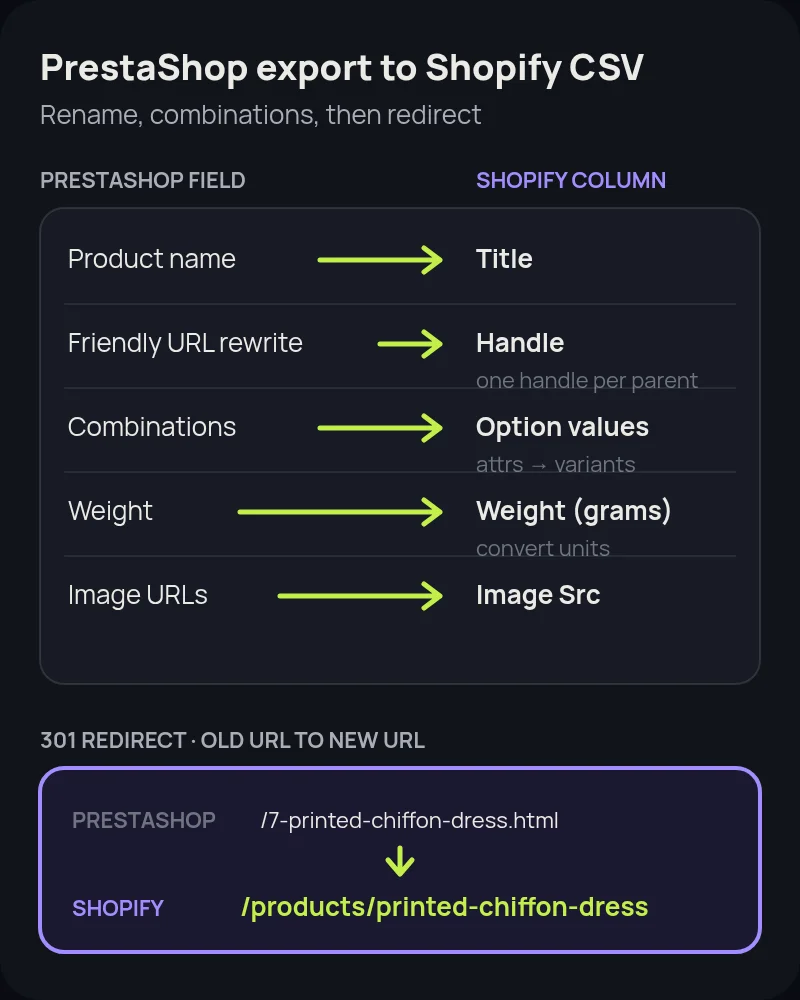
- Handle: build a Shopify handle from the PrestaShop friendly URL rewrite (the words after the product ID) or from the product name. Handles can only contain letters, numbers and hyphens. Keep one handle per parent product so every combination row shares it.
- Title and body: the product name becomes Title. Description (and Summary if you want a short intro) becomes Body (HTML). Shopify accepts HTML in that column.
- Variants from combinations: PrestaShop combinations (colour, size, capacity and other attributes) become Option1 Name / Option1 Value rows under the same Handle, each with its own Variant SKU (usually the combination reference), Variant Price and Variant Inventory Qty. Do not import every combination as a separate product.
- Prices: tax-excluded or tax-included price maps to Variant Price depending on how you configure Shopify taxes. Specific prices and catalog rules usually need rebuilds as Shopify discounts or Markets pricing.
- Weights: Shopify's CSV wants variant weight in grams unless you set the unit column. Convert kilograms or pounds before import.
- Images: public image URLs become Image Src. Image URLs must stay reachable during the import.
- SEO fields: PrestaShop meta title and meta description become SEO Title and SEO Description. The friendly URL rewrite informs the Handle, not a separate SEO path field.
- Vendor and type: brand can become Vendor. Categories often land in Type or Tags, then you build collections from them. Reference / EAN / UPC / ISBN / MPN map to Shopify's barcode and SKU fields where they fit.
Delete PrestaShop columns that Shopify does not recognise before you import. After import, open a sample of products with many combinations and confirm variant counts, prices and images. Rebuild any product whose attributes do not fit Shopify's three-option / 100-variant ceiling.
Option 2: Use a migration app
For larger catalogs, combination-heavy products, order history, reviews or automated redirects, a migration app is usually faster than hand-editing CSVs.
- Cart2Cart: supports PrestaShop as a source. Connection typically uses a bridge or API access on the PrestaShop store. It can move products and combinations, categories, customers, orders, CMS content and reviews, with 301 redirects as an option.
- LitExtension: also supports PrestaShop to Shopify. Expect passwords not to transfer, so buyers reset on first login.
- PrestaShop-specific Shopify apps (for example Prestify and similar App Store listings): useful when you want a guided PrestaShop connector rather than a generic multi-cart tool.
- Matrixify: strong when you can first get PrestaShop data into its Excel/CSV templates. Useful for complex catalogs and for re-running imports during staging.
Run a demo or small pilot first. Compare product counts, combination/variant counts, customer emails and a handful of order totals against PrestaShop before you pay for a full run. Keep PrestaShop live during the transfer so you can capture delta orders near launch.
Protect your search traffic with redirects
PrestaShop URLs look nothing like Shopify's. That is the SEO risk of the move. PrestaShop's SEO & URLs documentation describes two product URL styles:
- Default / unfriendly: paths such as
/product.php?id_product=27or/index.php?id_product=8&controller=product - Friendly URLs (Shop Parameters > Traffic > SEO & URLs, requires server URL rewriting such as Apache
mod_rewrite): default product route{category:/}{id}-{rewrite}{-:ean13}.html, which produces URLs like/summer-dresses/7-printed-chiffon-dress.htmlor/2-music-players/27-ipod-nano-green
Categories, CMS pages and manufacturers get their own friendly patterns. On Shopify, products live at /products/printed-chiffon-dress, collections at /collections/, and pages at /pages/. The numeric PrestaShop ID in the path does not exist on Shopify, so every ranked URL needs an explicit 301.
- Crawl before you switch. Export ranking URLs from Google Search Console and crawl the PrestaShop store so you have every
id_product, friendly{id}-{rewrite}.html, category and CMS address that gets traffic. - Map one-to-one. Each old product URL should 301 to its new
/products/handle. Categories become collections. CMS pages become Shopify pages or blog posts. - Create redirects before the domain moves. In Shopify, go to Content > Menus > View URL redirects, or import a redirect CSV.
- Disconnect the domain from PrestaShop first. Shopify warns that a domain still pointed at the old platform can cause SSL certificate errors when you connect it.
- Submit the new sitemap in Search Console after launch, and spot-check your top old URLs by hand.
Our Shopify migration SEO checklist covers titles, structured data and post-launch monitoring in more detail.
PrestaShop to Shopify migration, step by step
- Audit the PrestaShop store: product and combination counts, modules, payment modules, carriers, multistore setup, and a full URL list from Search Console plus a crawl.
- Open a Shopify store on a trial or paid plan and pick a theme. Do not connect the live domain yet.
- Export from PrestaShop: products (with combinations), customers, categories, fulfilled orders if needed, CMS pages and image assets or public image URLs.
- Import products via an edited Shopify CSV or a migration app. Fix variants, weights, images and compare-at prices. Set sellable products to active only when they look right.
- Import customers next, then historical fulfilled orders if you are bringing them over. Turn off new-order notification emails before an order import so staff are not flooded.
- Rebuild what exports skip: collections from old categories, navigation, About/shipping/returns pages, gift cards, cart rules as Shopify discounts, and apps that replace PrestaShop modules (reviews, subscriptions, loyalty, ERP).
- Configure payments, shipping and taxes, then place test orders, including a failed payment and a refund.
- Load the redirect map for every important PrestaShop URL. Test a sample on a temporary domain or after hosts-file testing if you can.
- Disconnect the domain from PrestaShop, connect it to Shopify, wait for DNS and SSL, submit the Shopify sitemap, and monitor 404s.
- Cancel Hosted billing or decommission the Classic server only after orders flow on Shopify and Search Console looks stable. Keep a PrestaShop database and file backup for your records.
How long a PrestaShop migration takes
Timelines vary with catalog complexity, module count and how custom the theme is — more than with the PrestaShop logo on the login screen.
- Small catalog (under a few hundred SKUs, few combinations): about one to two weeks for data, theme setup, redirects and testing if someone is on it full time.
- Mid-size catalog with many combinations and modules: three to six weeks is common, including a staging review and a redirect QA pass.
- Large, multistore or heavily customised PrestaShop builds (custom modules, ERP links, complex specific prices): plan for two to three months, often with a Partner or agency.
Build in a freeze window before cutover so new PrestaShop products and price changes can be re-exported. Apps that offer a recent-data or delta migration help close that gap on launch day.
Common mistakes to avoid
- Assuming the Store Migration app supports PrestaShop. It does not list PrestaShop. Plan for CSV mapping or a third-party app from day one.
- Importing combinations as separate Shopify products. You end up with orphan SKUs instead of variants. Group by parent product first.
- Ignoring the product ID in friendly URLs.
/7-printed-chiffon-dress.htmland/summer-dresses/7-printed-chiffon-dress.htmlboth need redirects to the same Shopify handle. - Skipping weight unit conversion. Wrong grams throw off every carrier rate.
- Leaving image hosts unreachable. If PrestaShop image URLs 404 during import, Shopify stores broken images.
- Moving the domain before redirects exist. Ranked friendly and
id_productURLs will 404 and leak equity. - Promising password continuity. Customers will need a reset link. Tell them before launch.
- Importing open or unfulfilled orders. Shopify recommends historical fulfilled orders only.
- Forgetting modules that hold data outside core tables (reviews, loyalty points, custom fields). Inventory those modules before you cut over.
How Startup Slang helps
We have moved brands to Shopify from Magento, WooCommerce, BigCommerce and Salesforce Commerce Cloud, and our Wix, Squarespace, Etsy, Square and Volusion guides cover moves from website builders, marketplaces, POS-led stores and legacy hosted platforms. A PrestaShop move centres on combinations-to-variants mapping and those {id}-{rewrite}.html URL maps. Our Shopify migration team handles the data, redirects, theme and apps from our offices in Toronto and Montreal. If you are still choosing a platform, our Shopify agency team can help you pick a plan and a build approach.
Frequently asked questions
Does Shopify's Store Migration app support PrestaShop?
No. Shopify's Store Migration app lists Square, WooCommerce, Etsy, Wix, Amazon, eBay, Clover and Lightspeed R/X as sources. PrestaShop is not on that list, and Shopify's Migrate to Shopify help article does not include a PrestaShop-specific guide. Reshape PrestaShop CSVs to Shopify's templates or use a third-party migration app.
How do I export products from PrestaShop?
In the PrestaShop back office open Catalog > Products and use Export for the columns currently shown in the list. For combinations, images, meta fields and features, use Advanced Parameters > Database > SQL Manager or a migration module/app, because the simple list export is often too thin for a full catalog rebuild.
What happens to PrestaShop combinations on Shopify?
PrestaShop combinations (colour, size, capacity and other attributes under one product) become variants under one Shopify parent Handle, each with its own SKU, price and inventory. Importing every combination as a separate product creates orphan SKUs.
Will customer passwords move to Shopify?
No. Passwords cannot be migrated from PrestaShop in a usable form for Shopify. Customers sign in on Shopify with a password-reset link. Tell them before launch so support is not flooded on day one.
How do PrestaShop URLs redirect to Shopify?
Unfriendly URLs look like /index.php?id_product=8&controller=product. With Friendly URLs enabled the default product route is {category:/}{id}-{rewrite}{-:ean13}.html, for example /summer-dresses/7-printed-chiffon-dress.html. Map each one to its new /products/ handle with a 301 redirect in Shopify before you move the domain.
Is Shopify cheaper than PrestaShop?
It depends. PrestaShop Classic is a free download but you pay for hosting, modules and maintenance. PrestaShop Hosted starts at €24 a month excl. VAT with annual payment, or €29 monthly with no commitment. Shopify Basic is $29 a month billed yearly or $39 monthly with hosting included. Compare total cost of ownership, not only the software fee.
How long does a PrestaShop to Shopify migration take?
A small catalog can move in about one to two weeks. Mid-size stores with many combinations and modules often need three to six weeks. Large, multistore or heavily customised PrestaShop builds can take two to three months.