
OpenCart is a free, open-source PHP shopping cart that has run small and mid-size stores since the late 2000s. Merchants install it on their own hosting, add extensions from the OpenCart Marketplace, and maintain the server, upgrades and security patches themselves. When catalogs grow, PHP versions move on and extensions stop keeping up with core releases, many of those stores look at Shopify. That is when an OpenCart to Shopify migration comes up.
This guide covers what the move involves in 2026: how OpenCart's running costs compare with Shopify's plans, why OpenCart has no built-in product CSV export, why Shopify's free Store Migration app does not list OpenCart as a source, how OpenCart options and OpenCart 4 variant products map to Shopify variants, how OpenCart's index.php?route= and SEO keyword URLs should redirect, and the launch order that protects search traffic. Facts come from OpenCart's own documentation and release history and from Shopify's pricing and help pages, checked on November 8, 2026. Shopify prices below are in US dollars and vary by country, so check your local pricing page.
Why sellers leave OpenCart for Shopify
OpenCart is free to download under the GPL licence. The current releases are OpenCart 4.1.0.4 and 3.0.5.1, both published on August 11, 2026 with PHP 8.5 support, according to OpenCart's download history. The software is free, but running it is not. You pay for hosting, SSL, paid extensions and themes, and the developer time to apply upgrades. Before 4.1.0.4, the 4.1 branch went about seventeen months without a stable release (4.1.0.3 shipped in March 2025), and many stores still run 2.x or 3.0 builds with extensions that block an upgrade.
Shopify bundles hosting, SSL, the online store and checkout into every plan. Here is how the two line up, using Shopify's pricing page and OpenCart's documentation.
| Comparison | OpenCart (self-hosted) | Shopify Basic |
|---|---|---|
| Software / plan fee | Free (open source, GPL) | $29/mo billed yearly, or $39 monthly |
| Hosting and SSL | Not included. You buy and manage them | Included |
| Upgrades and security patches | You (or your developer) apply them, and extensions must stay compatible | Handled by Shopify |
| Product limit | No software limit (server dependent) | Unlimited |
| Variants | Options on one product; OpenCart 4 adds master/variant products | Up to 2,048 variants and 3 options per product |
| Online card rate | Depends on the payment extension and gateway | 2.9% + 30¢ with Shopify Payments |
| Friendly URLs | Off until you enable Use SEO URL and rename htaccess.txt | Built in (/products/, /collections/) |
Shopify Grow is $89 a month billed yearly or $105 monthly. Advanced is $359 yearly or $399 monthly. Shopify Plus starts at $2,300 a month on the public pricing page. Shopify charges an extra 2% on Basic if you use a third-party payment provider instead of Shopify Payments.
Beyond price, sellers usually move for less server maintenance, a larger theme and app ecosystem, Markets for international selling, Shopify POS and a checkout they do not have to patch. OpenCart still fits merchants who want full PHP control, very low software cost and a developer on hand. Once the cost of keeping extensions, PHP and the core in sync outweighs that control, Shopify is a common next step.
What moves from OpenCart to Shopify, and what doesn't
OpenCart's admin has no native product CSV export. System > Maintenance > Backup & Restore creates a .sql database backup of the tables you select, which is a restore file, not a spreadsheet. To get data out in a usable form you need an export extension, a migration app or direct database queries. Shopify's help centre says to import products first, then customers, then historical orders that are already fulfilled, so products and customers can attach to those orders correctly.
| Data | How it leaves OpenCart | How it gets into Shopify |
|---|---|---|
| Products, options and variants | Export/import extension, SQL queries on the product and option tables, or a migration app | Edited Shopify product CSV, Matrixify, Cart2Cart or LitExtension |
| Categories | Extension export or SQL; SEO keywords live in the SEO URL table | Shopify collections (manual, CSV tags or app) |
| Customers | Extension export, SQL, or a migration app | Shopify customer CSV or a migration app |
| Orders | SQL or a migration app | Migration apps only (Shopify has no order CSV import) |
| Information pages | Catalog > Information; copy or migrate with an app | Shopify pages |
| Extensions and themes | Stay on OpenCart | Replace with Shopify themes and App Store apps |
| Customer passwords | Cannot be moved in a usable form | Customers reset passwords on first login |
| Page URLs | Stay on the old store until the domain moves | 301 redirects in Shopify |
Shopify's free Store Migration app imports from Square, WooCommerce, Etsy, Wix, Amazon, eBay, Clover and Lightspeed R/X (Vend). OpenCart is not on that list, and Shopify's Migrate to Shopify help section has no OpenCart-specific guide. Plan for either reshaped CSVs or a third-party migration app from day one.
Get your data out of OpenCart
Start with a full backup, then choose an extraction route that matches your catalog.
- Back up first: System > Maintenance > Backup & Restore, select all tables and run a backup. Download it and keep a copy of the store files too. This is your safety net, not your import file.
- Check your version: the admin footer shows it. Table structures, option handling and URL formats differ between 1.5, 2.x, 3.0 and 4.x, and migration apps ask for it.
- Export extension: an OpenCart Marketplace export/import extension can write products, options, categories and customers to CSV or Excel. Check that it supports your exact version.
- SQL queries: for heavily customised stores, query the product, product description, product option value, category, customer and order tables directly (with your table prefix, often
oc_). This is the most reliable route when extensions store their own data. - Images: product images sit on your server under
image/catalog/. Keep those URLs publicly reachable during import, or download and re-host them, so Shopify's Image Src column can fetch them. - SEO data: export each product's and category's meta title, meta description and SEO keyword. You need the keywords for your redirect map.
Also export (or crawl) every live URL: product, category, manufacturer and information pages, plus any index.php?route= URLs that rank in Search Console.
Option 1: Map OpenCart data to Shopify's product CSV
If your catalog is manageable and you want clean handles and variant structure, reshape the OpenCart export to match Shopify's product CSV and import it under Products > Import.
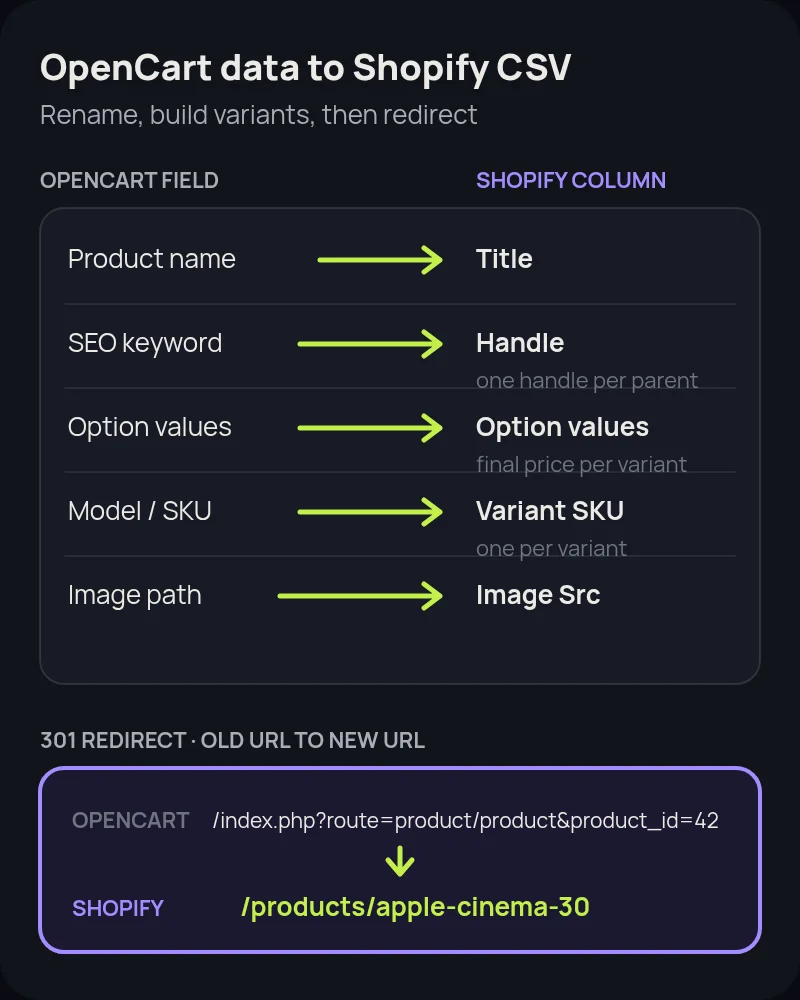
- Handle: use the product's SEO keyword (for example
apple-cinema-30) or a slug of the product name. Handles can only contain letters, numbers and hyphens. Keep one handle per parent product so every variant row shares it. - Title and body: product name becomes Title. Description becomes Body (HTML). Shopify accepts HTML in that column.
- Options to variants: Select and Radio options (size, colour, finish) become Option1, Option2 and Option3 columns under the same Handle. Shopify allows three options and up to 2,048 variants per product.
- Price modifiers: OpenCart option values add or subtract an amount from the base price (for example "+$5.00 Premium Cotton"). Shopify has no price prefix, so calculate the final price for each variant and put it in Variant Price.
- Stock per option: OpenCart tracks quantity per option value, not per combination. A shirt with 10 Medium and 5 Red does not tell you how many Medium Red shirts exist. Count real stock by combination before you set Variant Inventory Qty.
- OpenCart 4 variant products: if you used master and variant products, each variant is a separate product ID linked to a master. Group them under the master's handle as Shopify variants instead of importing them as separate products.
- Checkbox, text, file and date options: these are not variants. Rebuild add-ons and personalisation with a Shopify product-options app or line item properties.
- SKU, barcode and weight: Model or SKU becomes Variant SKU. UPC, EAN or ISBN map to Variant Barcode. Convert weights to grams, or set the weight unit column, and apply option weight modifiers per variant.
- SEO fields: meta title and meta description become SEO Title and SEO Description.
Delete columns Shopify does not recognise before you import. After import, open a sample of products with the most options and check variant counts, prices, stock and images.
Option 2: Use a migration app
For larger catalogs, order history, reviews or multi-language stores, a migration app is usually faster than hand-editing CSVs.
- Cart2Cart: supports OpenCart as a source. It usually connects through a bridge file uploaded to your OpenCart server and can move products, options, categories, customers, orders and reviews, with 301 redirects as an additional option.
- LitExtension: also supports OpenCart to Shopify, with a similar connector approach. Expect passwords not to transfer, so buyers reset on first login.
- Matrixify: strong once you have OpenCart data in its Excel/CSV template. Useful for complex catalogs and for re-running imports during staging.
Run a demo or small pilot first. Compare product counts, variant counts, customer emails and a handful of order totals against OpenCart before you pay for a full run. Keep OpenCart live during the transfer so you can capture delta orders near launch. Remove any bridge file from your server once the migration is done.
Protect your search traffic with redirects
OpenCart URLs look nothing like Shopify's, and they depend on your version and settings. That is the main SEO risk of the move. OpenCart's SEO URL documentation describes the two states:
- Default URLs:
/index.php?route=product/product&product_id=42, often with a category path such as&path=20_27. Categories useroute=product/category&path=20. - SEO URLs: after you set Use SEO URL to Yes under System > Settings > Server and rename
htaccess.txtto.htaccess, each page with an SEO keyword gets a clean path. In OpenCart 3 that is usually/apple-cinema-30or/desktops/mac/imac. OpenCart 4 adds a language and route segment by default, such as/en-gb/product/macbook.
Shopify product URLs always use /products/handle and collections use /collections/handle. Build a spreadsheet of every old URL and its new Shopify path, then add the redirects under Content > Menus > View URL redirects (or import a redirect CSV) before you move the domain.
- Map products with no SEO keyword by
product_id. Those pages only ever had theindex.phpURL. - Map both the category-path and bare versions of a product URL when both were indexed.
- Redirect manufacturer pages to a Shopify collection or vendor search, and information pages to Shopify pages.
- Include language versions for multi-language stores, and check Search Console for parameter URLs that still get clicks.
Our Shopify migration SEO checklist covers the rest: titles, canonicals, sitemaps and post-launch checks.
OpenCart to Shopify migration, step by step
- Audit the store. Version, product and option counts, extensions (Extensions > Extensions and Extensions > Modifications), languages, currencies and stores.
- Back up and crawl. Take a full database and file backup. Crawl the site and export 12 months of landing pages from Search Console and analytics.
- Choose plan and theme. Pick the Shopify plan that matches staff, reporting and payment needs, then choose a theme that suits your catalog.
- Extract and map data. Use an extension, SQL or a migration app. Rebuild options as variants with final prices and true combination stock.
- Import products, then customers, then fulfilled orders. Check samples after each step.
- Rebuild collections, navigation and pages. Turn categories into collections and information pages into Shopify pages.
- Replace extensions. Choose Shopify apps for reviews, product options, shipping rules, B2B pricing and anything else an extension handled.
- Set up payments, tax and shipping. Test checkout with real orders and refunds.
- Load redirects. Import every mapped old URL before launch.
- Launch and verify. Point the domain, submit the Shopify sitemap in Search Console, test a sample of old URLs and run a delta import of last-minute orders.
- Tell customers. Email them about the new store and the password reset before they try to log in.
How long an OpenCart migration takes
A small catalog with simple options can move in about one to two weeks. Mid-size stores with many options, extensions and order history often take three to six weeks. Large, multi-store, multi-language or heavily customised OpenCart builds can take two to three months. Most of the time goes into variant mapping, extension replacement and redirect testing, not the import itself.
Common mistakes to avoid
- Assuming the Store Migration app supports OpenCart. It does not list OpenCart. Plan for CSV mapping or a third-party app.
- Treating the SQL backup as an import file. Backup & Restore makes a database restore file, not a Shopify CSV.
- Copying option price prefixes as they are. Shopify needs a final price per variant.
- Guessing combination stock. OpenCart counts stock per option value. Count real stock per variant before launch.
- Importing OpenCart 4 variants as separate products. Group them under the master's handle.
- Forgetting
index.php?route=URLs. Products without SEO keywords and old indexed URLs still need redirects. - Moving the domain before redirects exist. Ranked URLs will 404 and lose equity.
- Leaving the migration bridge file on your server. Delete it after the final sync.
- Promising password continuity. Customers will need a reset link. Tell them before launch.
How Startup Slang helps
We have moved brands to Shopify from Magento, WooCommerce, BigCommerce and Salesforce Commerce Cloud, and our PrestaShop, Volusion, Wix, Squarespace, Etsy and Square guides cover moves from open-source stacks, legacy hosted platforms, website builders, marketplaces and POS-led stores. An OpenCart move centres on rebuilding options as true variants and mapping those index.php?route= and SEO keyword URLs. Our Shopify migration team handles the data, redirects, theme and apps from our offices in Toronto and Montreal. If you are still choosing a platform, our Shopify agency team can help you pick a plan and a build approach.
Frequently asked questions
Does Shopify's Store Migration app support OpenCart?
No. Shopify's Store Migration app lists Square, WooCommerce, Etsy, Wix, Amazon, eBay, Clover and Lightspeed R/X (Vend) as sources. OpenCart is not on that list, and Shopify's Migrate to Shopify help section has no OpenCart-specific guide. Reshape OpenCart data to Shopify's CSV templates or use a third-party migration app such as Cart2Cart or LitExtension.
How do I export products from OpenCart?
OpenCart has no native product CSV export. System > Maintenance > Backup & Restore creates a .sql database backup, which is a restore file rather than a spreadsheet. Use an export/import extension that supports your OpenCart version, query the product and option tables directly, or let a migration app read the data through its connector.
What happens to OpenCart product options on Shopify?
Select and Radio options such as size and colour become Shopify variants under one product handle, with up to three options and 2,048 variants per product. OpenCart price prefixes like +$5.00 must become a final price per variant, and stock counted per option value must be recounted per variant. Checkbox, text, file and date options need a product-options app or line item properties.
Will customer passwords move from OpenCart to Shopify?
No. Customer passwords cannot be moved in a usable form. Customers sign in on Shopify with a password-reset link, so tell them before launch to avoid a flood of support requests.
How do OpenCart URLs redirect to Shopify?
Default OpenCart product URLs look like /index.php?route=product/product&product_id=42. With SEO URLs enabled they become keyword paths such as /apple-cinema-30 in OpenCart 3 or /en-gb/product/macbook in OpenCart 4. Map each one to its new /products/ handle and add 301 redirects in Shopify before you move the domain.
Is Shopify cheaper than OpenCart?
It depends on your setup. OpenCart is free open-source software, but you pay for hosting, SSL, paid extensions and developer time for upgrades. Shopify Basic is $29 a month billed yearly or $39 monthly with hosting, SSL and checkout included. Compare total cost of ownership, not only the software fee.
How long does an OpenCart to Shopify migration take?
A small catalog with simple options can move in about one to two weeks. Mid-size stores with many options and extensions often need three to six weeks. Large, multi-store, multi-language or heavily customised OpenCart builds can take two to three months.