Every business has work that is repetitive, rules-based and slow: copying data between systems, answering the same questions, writing product descriptions, triaging tickets, chasing invoices, building weekly reports. AI automation takes that work off your team's plate so people can focus on decisions, creativity and customers.
Startup Slang is an AI-first agency for marketing and development. Since 2017 we have built digital products for brands such as Electronic Arts, Netflix, Shoppers Drug Mart, Capgemini and Panasonic. Today our AI Innovation Lab designs, builds and runs automation, agents and content engines for e-commerce and enterprise teams, and because we are also a development agency, we can connect AI to your store, CRM and internal systems ourselves.
This page explains what an AI automation agency does, the use cases we build, how a project runs from audit to support, the tools we work with, how AI automation differs from traditional automation and RPA, what drives the cost, and how to choose the right partner. It is part of our AI services.
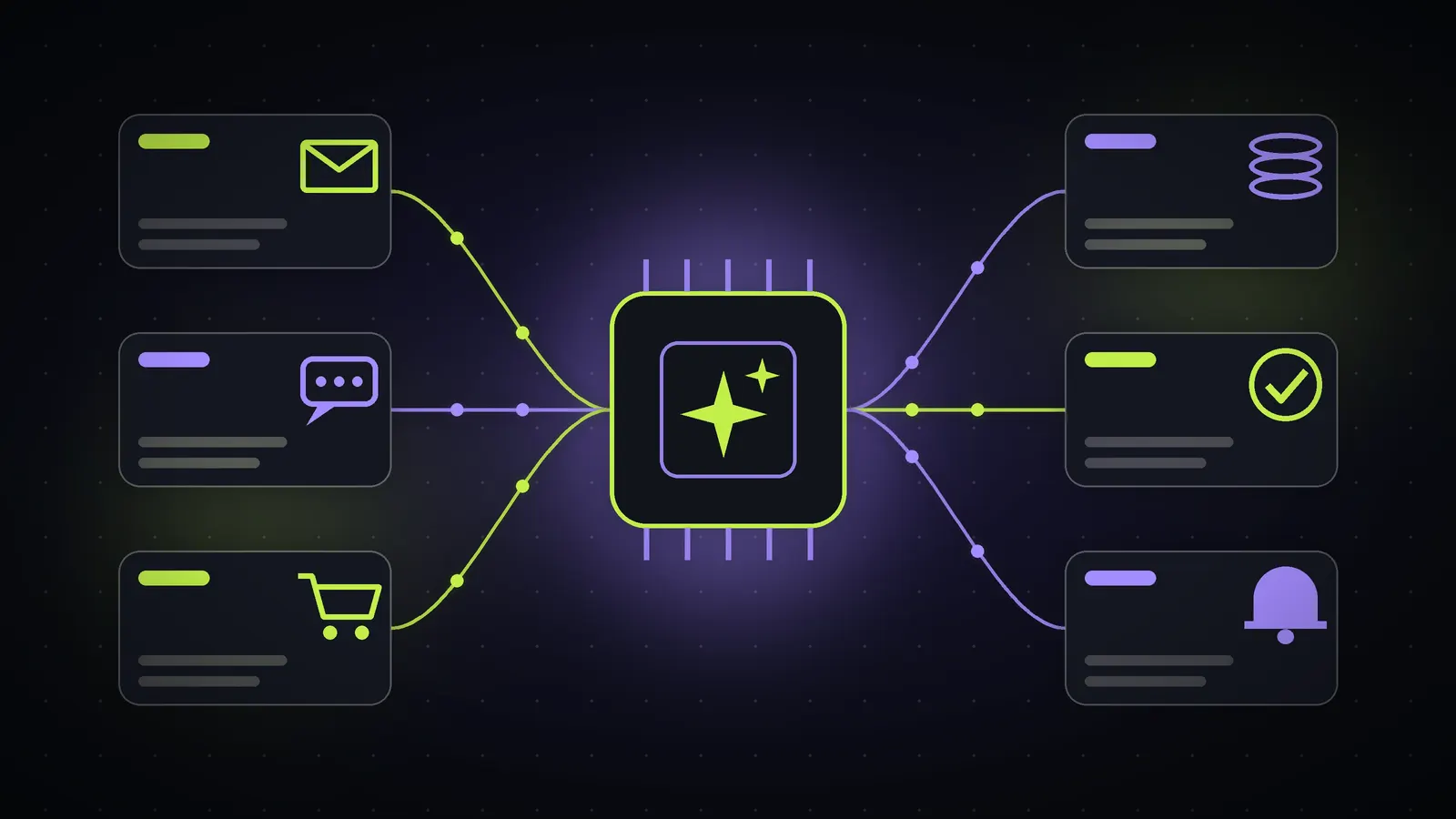
What an AI automation agency does
An AI automation agency combines three skills that rarely sit together:
- Process analysis. Finding which workflows are worth automating, and which are not.
- AI engineering. Choosing and configuring the right models, prompts, retrieval, guardrails and evaluation.
- Integration and software development. Connecting AI to the systems where work actually happens, then hosting, monitoring and improving it.
Tools like Zapier, Make and n8n are part of the toolkit. Custom code, APIs and AI agents fill the gaps those tools cannot.
The difference between an AI automation agency and a software vendor is that we start from your process, not from a product we need to sell. Sometimes the right answer is a simple rule in a tool you already pay for, such as a Shopify Flow workflow. Sometimes it is an AI agent that reads a request, looks up data in three systems and drafts the next action for a person to approve. Our guide to AI agents for business explains where agents fit and where they do not. When the answer is a dedicated agent, our AI agent development service designs, builds and tests it.
AI automation use cases we build
These are the workflows we are asked about most often. Each one can start small, with one team and one process, and grow once it proves its value.
Customer support
- AI chatbots and support agents that answer questions from your own help content, look up orders and hand off to people when needed
- Draft replies inside your help desk, such as Gorgias or Zendesk, for agents to approve
- Ticket tagging, prioritisation and routing by topic, language, sentiment and order value
Support is often the clearest first project, because volumes are high and many questions repeat. Read more in our guide to AI agents for customer support.
Sales and lead routing
- Lead qualification and routing from forms, chat and email
- Enrichment of new leads with company and context data before they reach your CRM, such as HubSpot or Salesforce
- Follow-up drafts and meeting summaries that update the CRM record, with a salesperson approving what goes out
E-commerce operations
- Product content generation: descriptions, attributes, SEO metadata and alt text at catalog scale
- Catalog enrichment and data cleanup before a Shopify migration
- Review, return and support-ticket analysis that surfaces product issues
- Inventory and order alerts across Shopify, BigCommerce and your ERP
- Order exception handling: flagging risky, delayed or incomplete orders and preparing the fix for a person to confirm
For stores on Shopify, we usually combine native automation with AI steps. Our Shopify agency team builds the store side; the automation team connects it to the rest of the business.
Marketing
- Content engines that produce on-brand social, email and search assets for review
- Audience segmentation and personalized email flows
- Reporting that summarizes performance across channels in plain language
Finance and back-office
- Document processing: invoices, purchase orders and forms extracted into structured data
- Matching invoices to purchase orders and flagging mismatches for review before anything is posted to an ERP such as NetSuite
- Month-end checklists, reconciliations and status reports prepared automatically for the finance team
Internal knowledge and operations
- Knowledge assistants that answer staff questions from policies, wikis and shared drives, with links to the source
- Meeting, research and report summarization
- Slack and Google Workspace assistants that turn requests into tasks, documents or approvals
Larger organisations with security reviews, many systems and several departments should also read about our enterprise AI automation approach, which adds governance, access control and phased rollout.
How we work: audit, design, build, deploy, support
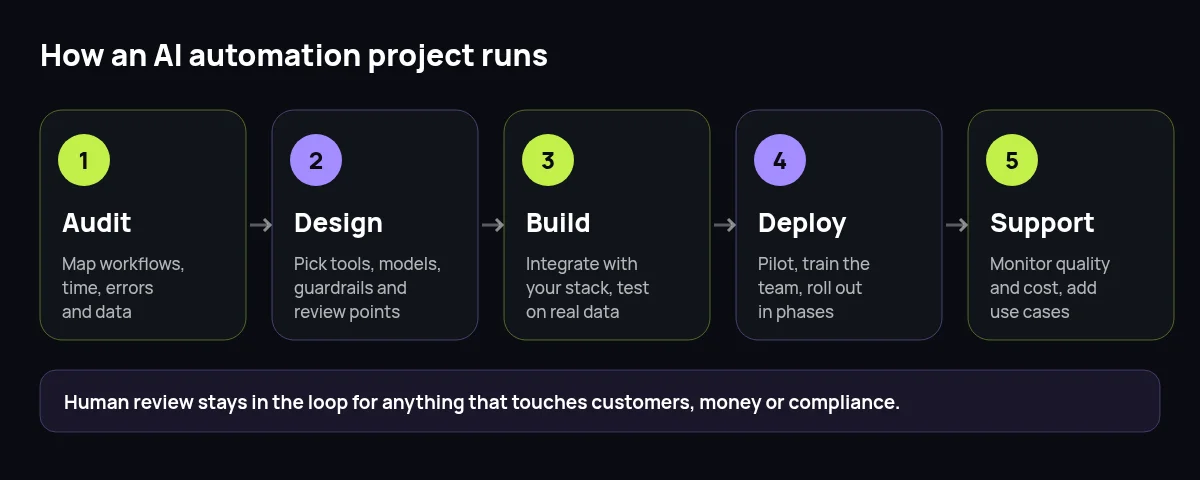
- Audit. We map your workflows with the people who do the work, measure time and error rates, and rank opportunities by impact, feasibility and risk. You get a prioritised roadmap, not a vague strategy.
- Design. For the first workflow we choose the tools and models, define what the system may and may not do, decide where a person approves the output, and agree how success will be measured.
- Build. We start with one high-value workflow, prove it on your real data and integrate it with your stack. Every automation includes guardrails, human review where it matters and logging. Before launch we test it against real examples, including the awkward ones.
- Deploy. We launch as a pilot with a small group, train the team, write the documentation and only then widen the rollout. Nothing goes live without a way to switch it off.
- Support and evolve. Models, prices and tools change monthly. We monitor quality and cost, add use cases and keep systems current.
The audit is the most important step. It is where we find out that a process everyone wants to automate is really three processes, or that the slow part is not the work itself but waiting for someone to approve it. Automating the wrong thing quickly is still the wrong thing.
Tools and integrations we work with
We are tool-agnostic and choose what fits your stack, data rules and budget. These are tools we regularly work with; we are not resellers, and the list is not a set of partnerships.
- Automation platforms: Zapier, Make and n8n, including self-hosted n8n when data needs to stay in your environment.
- AI models: large language models from providers such as OpenAI, Anthropic and Google, chosen per task for quality, speed, cost and data terms.
- Commerce: Shopify and Shopify Plus, including Shopify Flow, plus BigCommerce and WooCommerce.
- CRM and sales: HubSpot and Salesforce.
- Customer support: Gorgias and Zendesk.
- Finance and ERP: NetSuite and accounting tools that offer an API.
- Collaboration: Slack and Google Workspace (Gmail, Drive, Sheets, Docs).
- Custom code: APIs, webhooks, retrieval systems and small internal apps when no-code tools reach their limits. See our custom AI development service for larger builds.
AI automation vs traditional automation and RPA
Traditional automation and robotic process automation (RPA) are good at predictable, rules-based work on structured data. AI automation adds the ability to handle language, documents and judgment calls. Most of the systems we build combine both.
| Traditional automation and RPA | AI automation and AI agents | |
|---|---|---|
| Best for | Fixed rules, structured data, stable screens | Emails, tickets, documents, chat and decisions that need context |
| How it works | If this, then that; or a bot clicks through the same steps | A model reads, classifies, drafts or decides the next step, within limits you set |
| Handles exceptions | Breaks or stops when inputs change | Adapts to variation and escalates what it is unsure about |
| Main risk | Brittle when a screen or field changes | Wrong or invented answers if not grounded, tested and reviewed |
| Controls needed | Error alerts and change management | Guardrails, evaluation, logging and human approval for key actions |
A practical rule: use rules for what is predictable, AI for what needs reading or judgment, and people for exceptions and anything that commits money, changes a customer record in a way that matters, or carries legal risk.
Responsible AI by design: guardrails and privacy
- Your data stays protected. We choose providers and configurations that do not train on your data, minimize what is sent to models and respect Canadian privacy law, including PIPEDA and Quebec's Law 25.
- Humans stay in the loop for decisions that affect customers, money or compliance.
- Measured quality. We test automations against real examples before launch and track accuracy after.
- No lock-in. You own the workflows, prompts, code and documentation.
In practice, that means a few specific habits. Under PIPEDA, we map what personal information each workflow touches and limit it to what the purpose needs. Quebec's Law 25 adds duties such as telling people when a decision about them is made only by automated processing, and assessing privacy risk before information leaves Quebec; we design workflows so a person reviews those decisions and the assessment has the facts it needs. For clients with customers in Europe, the GDPR adds rules on lawful basis, data transfers and automated decision-making, and the EU AI Act adds transparency duties such as telling people when they are talking to an AI system. Marketing automations also respect Canada's anti-spam law (CASL) on consent. Your legal team remains responsible for final compliance sign-off; our job is to make the system easy to review.
What affects the cost of AI automation
We do not publish a price list, because two automation projects rarely have the same scope. After the audit you get a fixed scope and quote for the first workflow. These are the factors that move it:
- Number of workflows and how many steps, branches and exceptions each one has.
- Systems to connect, and whether they have good APIs or need custom work.
- Data quality: clean, structured data is quicker to automate than scattered spreadsheets and inboxes.
- Level of AI involved: a classification step is simpler than a multi-step agent that acts across several tools.
- Accuracy and review requirements: customer-facing and regulated workflows need more testing, evaluation and approval steps.
- Security and compliance: enterprise reviews, data residency and privacy assessments add time.
- Running costs: model usage and platform subscriptions, which we estimate and monitor with you.
- Ongoing support: how much monitoring, improvement and new use cases you want after launch.
How to choose an AI automation agency: a checklist
Many agencies added "AI" to their name recently. These questions help separate a partner who can build and run AI systems from one who only resells a tool:
- Do they audit before they build? Ask how they choose use cases and decide what not to automate.
- Can they integrate? An agent that cannot read your orders or update your CRM is a demo. Ask which systems they have connected and how.
- Are they tool-agnostic? Be careful if every answer is the same platform.
- How do they test quality? Look for evaluation on real examples before launch and monitoring after.
- Where are the human checkpoints? They should be named in the design, not added later.
- How do they handle privacy? Ask about PIPEDA, Law 25 and GDPR, data retention and which providers see your data.
- Who owns the work? You should own workflows, prompts, code and documentation.
- What happens after launch? Ask who monitors the system and how changes are made.
- Can they show relevant experience honestly? Ask for examples, and notice whether they separate AI results from other work.
For a local view, see our guide on how to choose an AI agency in Toronto.
Where AI meets our client work
AI is not a separate department at Startup Slang; it is part of how we deliver. For Capgemini we turned complex consulting and technology subjects into clear digital content. On e-commerce builds such as Wellwise for Shoppers Drug Mart and Design Home for Electronic Arts, we know the commerce systems that AI needs to plug into, because we built them. Those projects are development and content work, not AI automation case studies; we will publish AI automation results only when they are measured and the client agrees.
Why choose Startup Slang as your AI automation agency
- Builders, not just advisers. We design, code, integrate and host.
- E-commerce depth. Shopify, Shopify Plus, BigCommerce and WooCommerce experience means AI that works with your store, not next to it.
- Marketing and development in one team, so automations connect to growth goals.
- Local offices in Toronto and Montreal, serving clients across Canada, the US and Europe, in English and French.
- Verified reviews: 5.0 on Clutch from 5 reviews.
Learn more in our guides to AI agents for business, AI agents for customer support, Shopify Flow automation, AI marketing automation for e-commerce and AI for Shopify stores, or see all AI services.