
Etsy is one of the easiest places to make a first sale. Buyers already search there, and you can open a shop in an afternoon. As a shop grows, though, fees add up, you can't build your own brand on etsy.com, and you don't fully own your customer relationships. That's when many sellers open a Shopify store, either to replace Etsy or to run next to it.
This guide covers what an Etsy to Shopify migration involves: what each platform charges, what Etsy lets you export, when Shopify's free Store Migration app is enough, how to reshape the listings CSV by hand, and what happens to your traffic. Every fee and limit comes from Etsy's and Shopify's own help pages, checked on November 4, 2026. Prices are in US dollars unless we say otherwise.
Why sellers move from Etsy to Shopify
Most sellers move for three reasons: fees, brand and ownership. Etsy charges per listing and per sale. Shopify charges a monthly plan, and with Shopify Payments there's no extra transaction fee. Your Etsy shop lives at an etsy.com address inside Etsy's design, while a Shopify store runs on your own domain and theme. And Etsy's rules limit how you can market to the buyers who order from you.
Here is what one $50 sale with free shipping costs a US seller on each platform, using Etsy's fee schedule, Etsy Payments processing rates and Shopify's pricing page.
| Fee on a $50 sale | Etsy | Shopify Basic |
|---|---|---|
| Listing fee | $0.20 per listing, which lasts 4 months | None |
| Transaction fee | 6.5% = $3.25 | None with Shopify Payments (2% with a third-party payment provider) |
| Card processing | 3% + $0.25 = $1.75 | 2.9% + 30¢ = $1.75 |
| Offsite Ads, if the sale came from one | 15% = $7.50 (12% once you've sold $10,000 in 365 days; capped at $100 per order) | None; you pay for your own ads |
| Monthly plan | None required | $29 a month billed yearly, or $39 monthly |
| Total for this sale | $5.20, or $12.70 with Offsite Ads | $1.75, plus the monthly plan |
On these numbers, Etsy costs $3.45 more per $50 order than Shopify, so the Basic plan at $29 a month pays for itself at about nine such orders a month. That's the fee math. The catch is traffic: Etsy's fees pay for a marketplace full of shoppers, and a new Shopify store starts with none. Budget for the email, search, social and ads work that brings people to your own store.
Canadian sellers pay a little more on Etsy. Processing is 3% + C$0.25 on Canadian and US orders and 4% + C$0.25 on other international orders, and Etsy adds a 0.50% Regulatory Operating fee in Canada. Etsy also charges 2.5% for currency conversion when your listing currency differs from your payment account currency. On the Shopify side, Canadian visitors see prices in Canadian dollars: on November 4, 2026, Basic showed as C$37 a month billed yearly or C$49 monthly, with online card rates from 2.8% + 30¢ CAD. Shopify is testing prices, so check the live page.
Move completely, or run Etsy and Shopify side by side?
You don't have to close your Etsy shop. Many sellers keep it as a sales channel and use Shopify as the home of the brand. If you run both, keep stock in sync so you don't sell the same item twice. Shopify's Etsy migration guide notes that new connections to Etsy can't currently be made with the Shopify Marketplace Connect app, and points to third-party apps such as Shuttle - Sync with Etsy and Etsy Integration - ShopList for syncing.
One rule matters here. Etsy's Off-Platform Transactions policy bans directing Etsy buyers to buy outside Etsy or paying outside Etsy Payments. Don't use your Etsy listings, messages or order notes to send buyers to your Shopify store. Grow the Shopify store through your own channels instead.
What moves from Etsy to Shopify, and what doesn't
Etsy's listings export covers your products. Everything else needs an app, a separate download or manual work.
| Data | How it leaves Etsy | How it gets into Shopify |
|---|---|---|
| Active listings | Listings CSV: title, description, price, currency code, quantity, tags, materials, image URLs and SKUs | Shopify's free Store Migration app, or an edited product CSV |
| Variations | In the same row as the listing | The app maps them (listings with 101+ combinations import without variants), or you split them into rows by hand |
| Sold-out and expired listings | Not in the export; renewing them costs a listing fee and sets variation quantities to 1 | Add them by hand, or renew only the ones you need |
| Customers and orders | Not in the listings export | Third-party migration or sync apps |
| Reviews | You can download your Etsy reviews | A reviews app that supports importing them |
| Shop and listing URLs | They stay on etsy.com | Nothing to redirect; your Shopify store builds its own URLs |
To get the file, open Etsy's Shop Manager, go to Settings > Options > Download Data, and under Currently for Sale Listings click Download CSV. Shopify's help page notes that the file only includes active listings.
Option 1: Shopify's Store Migration app
The Store Migration app is free and made by Shopify, and Etsy is one of its supported sources. You upload the Etsy listings CSV exactly as Etsy exported it, with no editing, and the app creates your products. It runs on desktop only.
Three things to know before you click import. Products come in as drafts, so they won't show in your store until you set them to active. Inventory goes to your default location. And any listing with 101 or more variation combinations imports without its variants, so you'll rebuild those products by hand or through a CSV. Shopify also says the app doesn't move orders, collections, navigation, SEO data, blog posts or pages, reviews or integrations.
Before importing, try Shopify's preview. When you sign up, choose Existing business and then Etsy. On the Shopify Home page, select Preview your Etsy shop on Shopify and click Generate preview to see your products in a Shopify theme before you commit.
Option 2: Reshape the Etsy CSV for Shopify
If you need more control, such as cleaner titles, different options or products with many variations, edit the CSV yourself and import it through Products > Import in Shopify. Click Add file, choose the CSV, then Upload and preview before importing.
The main job is variants. Etsy keeps each listing on one row, with all its variations in that row. Shopify needs one row per variant, all sharing the same URL handle, with the option names and values in the Option1, Option2 and Option3 columns. Shopify allows up to three options per product, and up to 2,048 variants.
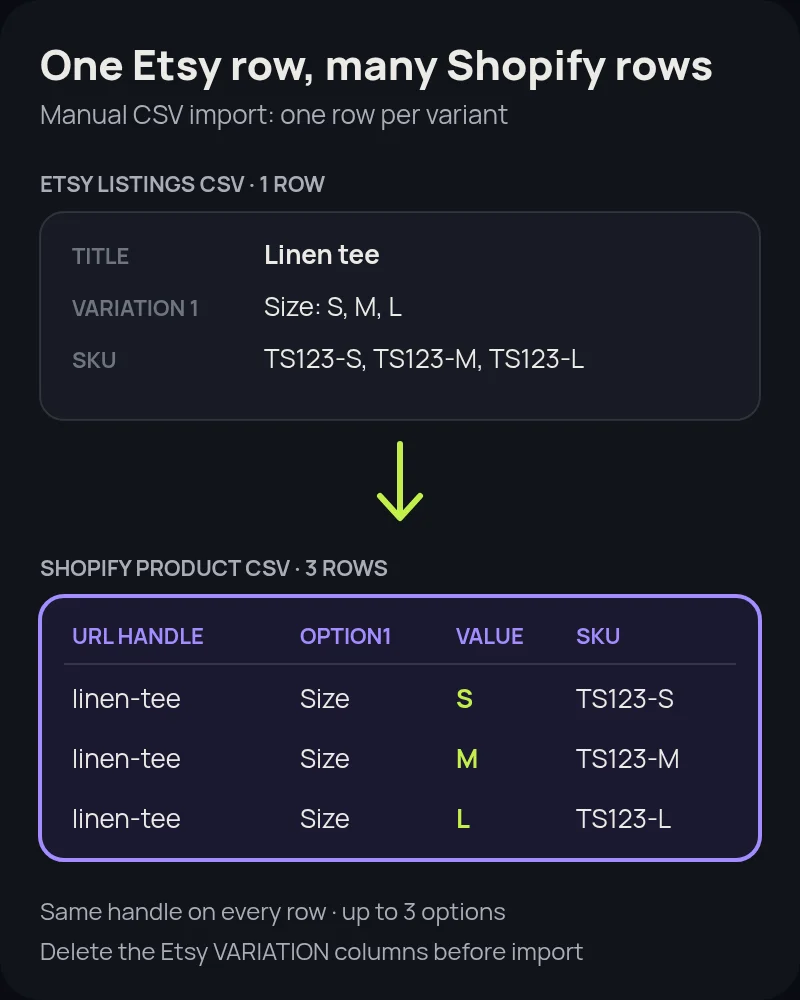
Shopify's guide uses a t-shirt in sizes S, M and L as the example. Split the Etsy SKUs so each size row has its own (TS123-S, TS123-M, TS123-L), delete the Etsy VARIATION columns, and use the optional variant image column if each variant has its own photo.
Plan for traffic: Etsy search doesn't move with you
When you move from Wix or WooCommerce to Shopify, you redirect your old URLs so rankings carry over. With Etsy, your shop and listing pages live on etsy.com, so there's nothing to redirect, and the rankings those pages earned stay with Etsy. Your Shopify store starts as a new site.
That means planning for discovery from day one:
- Write product pages for Google, not Etsy search. Etsy titles are often long strings of tags. Rewrite them as clear product names with real descriptions.
- Set up Google Search Console and submit the sitemap Shopify creates for you.
- Build collections and content around what your buyers search for, and link between them.
- Grow an email list the right way. Etsy's Seller Policy says you need a buyer's consent before adding them to a mailing list, and anti-spam laws such as Canada's CASL and the US CAN-SPAM Act apply to your own list too.
- If you used your own domain with Etsy before, set up redirects in advance under Content > Menus > View URL redirects, as Shopify's guide advises.
Our Shopify migration SEO checklist covers the technical setup in more detail.
Etsy to Shopify migration, step by step
- Decide whether to move or run both. If you keep Etsy, choose a sync app before launch so stock stays accurate on both.
- Download your Etsy data: the Currently for Sale Listings CSV and your reviews. List any sold-out or expired items you want on Shopify and add them by hand.
- Start your Shopify store as an existing Etsy business and generate the preview.
- Import your products with the Store Migration app, or with an edited CSV if you need to restructure variants.
- Check every product: titles, descriptions, prices, images, variants and SKUs. Rebuild any listing that had 101 or more combinations, then set products to active.
- Build what the import skips: collections, navigation, About, shipping and returns pages, and your store policies.
- Set up payments, shipping and taxes for the countries you sell to.
- Import reviews with a reviews app that accepts your Etsy download.
- Connect your domain, add redirects if you used that domain before, and submit your sitemap in Search Console.
- Launch through your own channels: social profiles, your opted-in email list, search and ads.
Common mistakes to avoid
- Sending Etsy buyers to Shopify through Etsy. It breaks Etsy's off-platform rules and can put your Etsy shop at risk.
- Expecting Etsy's traffic to follow you. Plan and budget for marketing before you rely on Shopify sales.
- Forgetting that imports arrive as drafts. Products imported by the app won't show until you set them to active.
- Losing variants on big listings. Check every listing with 101 or more combinations after import.
- Renewing every expired listing just to export it. Each renewal costs a listing fee and sets variation quantities to 1.
- Running both shops without a sync. One-off items sold on both channels at once lead to cancelled orders.
How Startup Slang helps
We have moved brands to Shopify from Magento, WooCommerce, BigCommerce and Salesforce Commerce Cloud, and our Wix and Squarespace guides cover moves from website builders, and our Square to Shopify guide covers stores that also sell in person. An Etsy move is usually smaller, but it still needs clean product data, careful variants and a plan for traffic. Our Shopify migration team handles the data, theme, apps and launch from our offices in Toronto and Montreal. If you're still choosing a setup, our Shopify agency team can help you pick a plan and a build approach.
Frequently asked questions
Can I move my Etsy shop to Shopify for free?
The tools are free: Shopify's Store Migration app costs nothing and imports the listings CSV that Etsy lets you download. You still need a Shopify plan. Shopify offers a 3-day free trial, then $1 a month for 3 months, and Basic is $29 a month billed yearly or $39 monthly after that.
Will my Etsy reviews move to Shopify?
Not with the Store Migration app. You can download your Etsy reviews and import them with a Shopify reviews app that supports it.
Can I keep my Etsy shop after moving to Shopify?
Yes. Many sellers run both and use a sync app, such as Shuttle - Sync with Etsy or Etsy Integration - ShopList, to keep stock accurate. New Etsy connections can't currently be made with Shopify Marketplace Connect. Don't use Etsy listings or messages to send buyers to your Shopify store, because Etsy's off-platform rules ban it.
Will I lose my Etsy rankings when I move to Shopify?
Your Etsy shop and listing pages stay on etsy.com, so their rankings stay with Etsy and can't be redirected. Your Shopify store starts as a new site and builds its own search traffic through product pages, collections, content and Search Console.
Is Shopify cheaper than Etsy?
Per sale, usually. On a $50 order, Etsy's listing, transaction and processing fees come to $5.20 for a US seller, versus $1.75 in card fees on Shopify Basic with Shopify Payments. But Shopify charges a monthly plan and brings no marketplace traffic, so you pay to bring shoppers to your own store.
Can I import Etsy variations into Shopify?
Yes. The Store Migration app maps them, except on listings with 101 or more variation combinations, which import without variants. With a manual CSV, give each variant its own row under one URL handle. Shopify allows up to three options and 2,048 variants per product.
Can I email my Etsy customers about my new store?
Only with their consent. Etsy's Seller Policy says you need a buyer's permission before adding them to a mailing list, and anti-spam laws such as Canada's CASL and the US CAN-SPAM Act also apply.