
Wix is a good place to start a business online. Its editor is easy, and plenty of brands make their first sales there. But as a store grows, many owners want deeper commerce tools, a larger app ecosystem and a checkout built only for selling. That is usually when the Wix to Shopify question comes up.
The move itself is manageable, because both platforms publish clear export and import tools. The risks are in the details: product options, data that Wix can't export, URLs that change, and a domain that may be registered at Wix. This guide is the plan we follow. Every limit below comes from Shopify's Wix migration guide and the Wix Help Center, checked on November 1, 2026.
Why brands move from Wix to Shopify
We compare the two platforms in detail in Shopify vs Wix. In short, the reasons we hear most from Wix store owners are:
- Commerce depth. Shopify is built only for selling, with variants, inventory across locations, B2B, markets and a checkout that millions of shoppers already use.
- Apps and integrations. Most subscription, loyalty, reviews, shipping and ERP tools build for Shopify first.
- Room to grow. Shopify Plus, headless builds and multi-store setups are there when the business needs them, without changing platform again.
If your site is mostly content and bookings with a small shop on the side, Wix may still be the better fit. A migration pays off when selling products is the core of the business.
What moves from Wix to Shopify, and what doesn't
Shopify's guide lists four kinds of data most Wix stores move: products, customers, historical orders and reviews. Each one moves differently.
| Data | How it leaves Wix | How it gets into Shopify |
|---|---|---|
| Physical products | CSV export, up to 5,000 rows per file | Shopify's free Store Migration app, or an edited product CSV (15 MB max per file) |
| Digital products | Wix can't export them | Add them to Shopify by hand |
| Customers | Contacts CSV. Only the site owner can export, up to 50,000 at a time | Store Migration app, or an edited customer CSV. Passwords don't move. |
| Order history | Orders CSV (times are in UTC) | Third-party apps such as Cart2Cart, LitExtension or EZ Importer |
| Reviews | Wix can't export them | Re-import with a reviews app such as Judge.me, Loox or Yotpo |
| Pages and blog posts | Not part of the store export | Rebuild, copy, or use a migration app or the API |
Two practical points from those limits. First, export products before you close or downgrade the Wix store, because Shopify downloads product images from the Wix image URLs during import. Second, check whether you sell digital products or keep reviews you care about, since neither comes out of Wix in a file.
Option 1: Shopify's Store Migration app
The Store Migration app is a free app made by Shopify. It accepts the product and customer CSV files exported from Wix as they are, with no editing. You upload the files, click Import products (and Import customers), then read the import report, which lists what came in and what had issues.
It is the fastest route for a simple catalog, but know its limits before you rely on it:
- Options. Wix products can have up to 6 options. Shopify products can have up to 3. A Wix product with 4 or more options imports as a single product with no options or variants, so you rebuild those variants afterwards.
- Drafts and tags. Imported products arrive as drafts. Wix collections and ribbons become product tags, so you rebuild your collections in Shopify.
- What it skips. According to Shopify's own write-up, the app doesn't import orders, collections, menus, SEO data, blog posts and pages, reviews or integrations. It also sets each product to its highest price and doesn't import inventory by location.
Option 2: Map the Wix CSV to Shopify's format
For larger or messier catalogs, editing the CSV gives you more control. The structures differ: a Wix export marks each row as a Product row or a Variant row, while in a Shopify product CSV every row is a variant, and rows for the same product share a URL handle. You merge each Wix Product row with its first Variant row, keep the other Variant rows, and delete the fieldType column. The columns that need the most care are:
| Wix column | Shopify column | What to change |
|---|---|---|
| handleId | URL handle | Letters, numbers and dashes only. This becomes the product URL. |
| price + surcharge | Price | Wix stores a variant price as product price plus surcharge. Add them together. |
| discountMode / discountValue | Compare-at price | Original price goes in Compare-at price, the discounted price in Price. |
| weight | Weight value (grams) | Convert to grams: kilograms × 1,000, pounds × 453.592. |
| inventory | Inventory quantity | Replace InStock or OutOfStock with real numbers. |
| productImageUrl | Product image URL | Wix separates images with semicolons. Put each image on its own row. |
| collection | Collection | A product CSV takes one collection. Add the rest after import. |
| productOptionDescription | Option value | One value per row. Change colours like #000000:Black to Black. |
When you import, deselect "Publish new products to all sales channels". If you leave it on, products you had hidden on Wix go live on channels like Shopify POS and the Shop app. Then check prices, weights, inventory and variants on a sample of products, because errors there cost money. Shopify allows up to 3 options and 2,048 variants per product, according to Shopify's Help Center.
Build the URL map before you switch the domain
By default, Wix puts store products at /product-page/ and blog posts at /post/, as described in Wix's URL structure guide. Shopify uses fixed prefixes: /products/, /collections/, /pages/ and /blogs/. Nearly every URL that earns traffic will change, so the redirect map is the most important SEO task in the project.
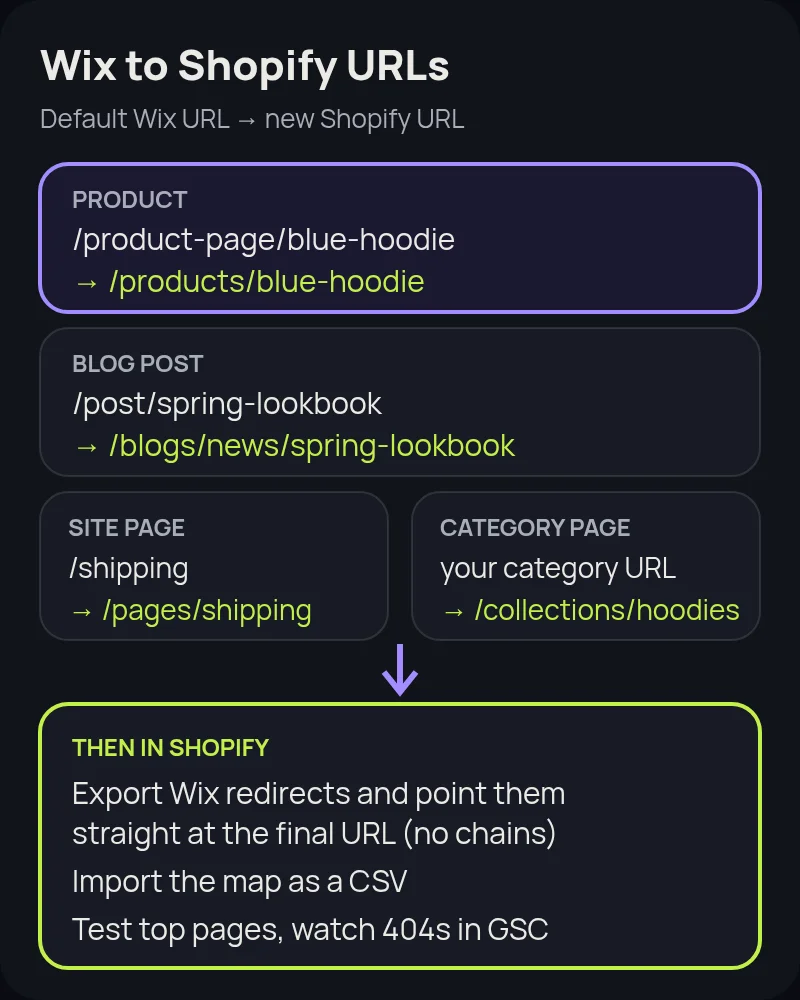
- Crawl the live Wix site and list every product, category, page and blog URL. Wix lets owners rename the
/product-page/and/post/prefixes, so check your real URLs rather than assuming the defaults. - Export your existing Wix redirects from the URL Redirect Manager (More Actions › Export redirects). Older redirects still carry links.
- Pull your top pages and links from Google Search Console so the pages that bring in traffic get checked by hand.
- Map each old URL to one new URL, and point old redirects straight at the final Shopify URL so nothing chains.
- Import the map as a CSV in Shopify under Content › Menus › View URL redirects, before the domain moves.
Our Shopify migration SEO checklist covers titles, meta descriptions, structured data and the launch-day checks in more detail.
Moving a domain you bought from Wix
If your domain was registered through Wix, you have two choices. You can keep it at Wix and point it to Shopify, or transfer it away. Wix's transfer guide notes a few things to plan for:
- ICANN rules block a transfer within 60 days of registering the domain, changing the registrant contact details, or a previous transfer.
- You start the transfer in Domains › Transfer away from Wix, and Wix emails an authorization (EPP) code to the registrant contact.
- A transfer usually takes up to 7 days.
- Business email stops working until you add the MX records again at the new provider.
Shopify also recommends disconnecting the domain from your old platform before connecting it, to avoid SSL certificate errors.
Wix to Shopify migration, step by step
- Audit. List products, options, digital goods, apps, forms, bookings, member areas and pages, and decide what moves, what gets replaced and what retires.
- Design the Shopify data model. Plan products and options, metafields, collections and menus before importing anything.
- Build the theme. Start from a strong Shopify theme or a custom one, and rebuild your key pages and blog.
- Import in order. Products first, then customers, then historical orders, so orders link to the right products and customers. Turn off new-order notifications while importing orders.
- Set up shipping, taxes and payments, then place test orders, including refunds and cancellations.
- Import redirects and test them. Click through your top old URLs and confirm each one lands on the right Shopify page.
- Launch. Connect the domain, submit the Shopify sitemap in Search Console (Shopify generates
sitemap.xmlautomatically) and watch 404s, rankings and conversion rate daily for the first few weeks.
Common mistakes to avoid
- Closing Wix too early. Product images import from Wix URLs, and you may need old data later. Keep the Wix site until the new store is stable.
- Ignoring products with 4+ options. They import without variants. Find them before import, not after launch.
- Publishing hidden products. Untick "Publish new products to all sales channels" on import.
- Forgetting reviews and digital products. Neither exports from Wix, so plan for them early.
- Surprising customers at sign-in. Passwords don't move. Tell customers before launch how to sign in to the new store.
- Not measuring. Record conversion rate, average order value, organic traffic and top rankings before the move so you can prove it worked.
How Startup Slang helps
We have moved brands to Shopify from Magento, WooCommerce, BigCommerce and Salesforce Commerce Cloud. A Wix move is usually smaller, but the same rules apply: a clean data model, careful variants and a complete redirect map. Our Shopify migration team handles the audit, theme, data, apps and redirects from our offices in Toronto and Montreal. If you are still deciding, our Shopify agency team can help you choose a plan and a build approach.
Frequently asked questions
Can I migrate from Wix to Shopify without losing SEO?
Yes, if you plan redirects. Wix puts products at /product-page/ and blog posts at /post/ by default, while Shopify uses /products/ and /blogs/, so most URLs change. Map each important old URL to its new Shopify URL, update existing Wix redirects to point at the final URL, and import the redirects into Shopify before you switch the domain.
Is there a free way to move products from Wix to Shopify?
Yes. Shopify's Store Migration app is free and imports the product and customer CSV files exported from Wix without editing. It doesn't import orders, collections, menus, SEO data, blog posts, pages or reviews, so plan those separately.
What happens to Wix products with more than 3 options?
Wix allows up to 6 product options and Shopify allows 3. Shopify's guide says a Wix product with 4 or more options imports as a single product without its options or variants, so you need to rebuild them, split the product, or use metafields or an app.
Can I move my Wix order history and reviews?
Wix exports orders as a CSV, and third-party apps such as Cart2Cart, LitExtension or EZ Importer bring order history into Shopify. Wix can't export reviews, so Shopify suggests re-importing them with a reviews app such as Judge.me, Loox or Yotpo.
Can I keep my customers' Wix passwords?
No. Passwords don't transfer between platforms. Import customers' names, emails, phones and addresses, then tell customers before launch how to sign in to the new store.
How do I move a domain I bought from Wix?
You can keep it at Wix and point it to Shopify, or transfer it. Transfers start in Domains under Transfer away from Wix, need an EPP code that Wix emails to the registrant, and usually take up to 7 days. ICANN rules block transfers within 60 days of registration, a contact change or a previous transfer.
How long does a Wix to Shopify migration take?
It depends on catalog size, variants, apps and content, not just product count. A small catalog with simple options can move in a few weeks. Stores with complex variants, many pages or integrations take longer. We give a timeline after a short audit.