
Square is a natural first home for an online store when you already take payments with it in person. Your item library, inventory and customers are already there, and Square Online comes with every Square plan. As the store grows, though, many sellers want more themes, more apps, a deeper checkout and more control over SEO. That's when they look at Shopify.
This guide covers what a Square Online to Shopify migration involves: what each platform costs, whether to keep Square for in-person sales, what Square lets you export, when Shopify's free Store Migration app is enough, how to map the CSV by hand, and how to protect your search traffic. Every fee and limit comes from Shopify's and Square's own help and pricing pages, checked on November 5, 2026. Prices are in US dollars, and both companies price differently in Canada and other countries, so check your local page.
Why sellers move from Square Online to Shopify
Square Online is no longer a separate subscription. Under Square's unified plans, it comes with Square Free ($0 a month per location), Square Plus ($49 a month per location) and Square Premium ($149 a month per location). The catch is what the free plan leaves out. On Square's pricing page, connecting your own domain, abandoned cart emails, product reviews and expanded site customization all need Square Plus or Premium, and real-time shipping rates need Premium.
Shopify includes a custom domain and abandoned checkout recovery on every plan, and adds a much larger theme and app ecosystem. Here's what one $50 online card sale costs on each, using Square's and Shopify's pricing pages.
| On a $50 online sale | Square Free | Square Plus | Shopify Basic |
|---|---|---|---|
| Monthly plan | $0 | $49 per location | $29 billed yearly, or $39 monthly |
| Online card rate | 3.3% + 30¢ | 2.9% + 30¢ | 2.9% + 30¢ with Shopify Payments |
| Card fee on this sale | $1.95 | $1.75 | $1.75 |
| In-person card rate | 2.6% + 15¢ | 2.5% + 15¢ | 2.6% + 10¢ |
| Your own domain | Not included | Included | Included |
| Abandoned cart emails | Not included | Included | Included |
On fees alone, Square Free is the cheapest way to sell online, because there's no monthly charge. Once you need your own domain, the comparison is $49 a month per location on Square Plus against $29 to $39 a month on Shopify Basic, at the same 2.9% + 30¢ online rate. Shopify also charges a 2% fee on Basic if you use a third-party payment provider instead of Shopify Payments, and its advanced in-store features come with POS Pro at $89 a month per location.
Keep Square for in-person sales, or move everything?
This is the first decision, because it changes the whole project. You have two realistic setups:
- Move everything to Shopify. Products, customers, online orders and your point of sale all live in one system. Shopify's guide covers adding Shopify POS as a sales channel, and notes that some of your Square hardware might be compatible, so check Shopify's supported POS hardware list before you buy anything new.
- Keep Square POS in-store and sell online on Shopify. This works if your staff and hardware are settled on Square. You then need one system to own your catalog and stock. Square's pricing page lists a Thrive Inventory integration that syncs your Square catalog and inventory with Shopify.
Running two systems without a sync is where problems start. A last item sold in-store and online at the same time means a cancelled order and an unhappy customer.
What moves from Square to Shopify, and what doesn't
Square exports your products and customers as CSV files. Everything else needs an app, a separate export or a request to Square.
| Data | How it leaves Square | How it gets into Shopify |
|---|---|---|
| Products and variations | Item library CSV export | Shopify's free Store Migration app, or an edited product CSV |
| Inventory by location | In the item library export | The app matches each Square location to a Shopify location with the same name |
| Customers | Customer directory CSV export | The Store Migration app, or an edited customer CSV |
| Online orders | Square Online dashboard: Orders > Export Orders | Third-party apps such as Matrixify, LitExtension, EZ Importer or Cart2Cart |
| Reviews | Can't be exported from Square | Add them by hand with a reviews app such as Judge.me, Loox or Yotpo |
| Saved customer cards | Only on request to Square Support | Shopify's payment-method migration process |
| Page URLs | Stay on your old site | 301 redirects in Shopify |
Shopify's help page says you should only bring over historical orders that are already fulfilled. In-person sales sit on the Transactions page of your Square Dashboard, so keep a copy there for your records.
Option 1: Shopify's Store Migration app
The Store Migration app is free, made by Shopify, and lists Square as a supported source for products and customers. Export your item library from Square (Items & services > Items > Item library > Actions > Export library, as a CSV), upload that file to the app without changing it, and click Import. The app shows a report of what it imported and any items that had problems.
Shopify's Square migration guide lists five things to check after the import:
- Products arrive as drafts. Items archived in Square come in as archived. Review them and set the ones you sell to active.
- One price per variant. If a variation had different prices at different Square locations, the app uses the highest one.
- Unit-priced items import at $0. Set their selling price, and their unit price if you show one, after the import.
- Big items lose their variants. An item with more than 3 options or more than 100 variations imports without variants and at a price of $0, so you rebuild it in the Shopify admin.
- New locations may appear. If no Shopify location has the same name as a Square location, the app creates one, so check its address.
Option 2: Map the Square CSV to Shopify's template
If you want more control, such as cleaner handles, new categories or restructured variants, edit the Square export to match Shopify's product CSV template and import it through Products > Import. Shopify's guide maps the columns like this:
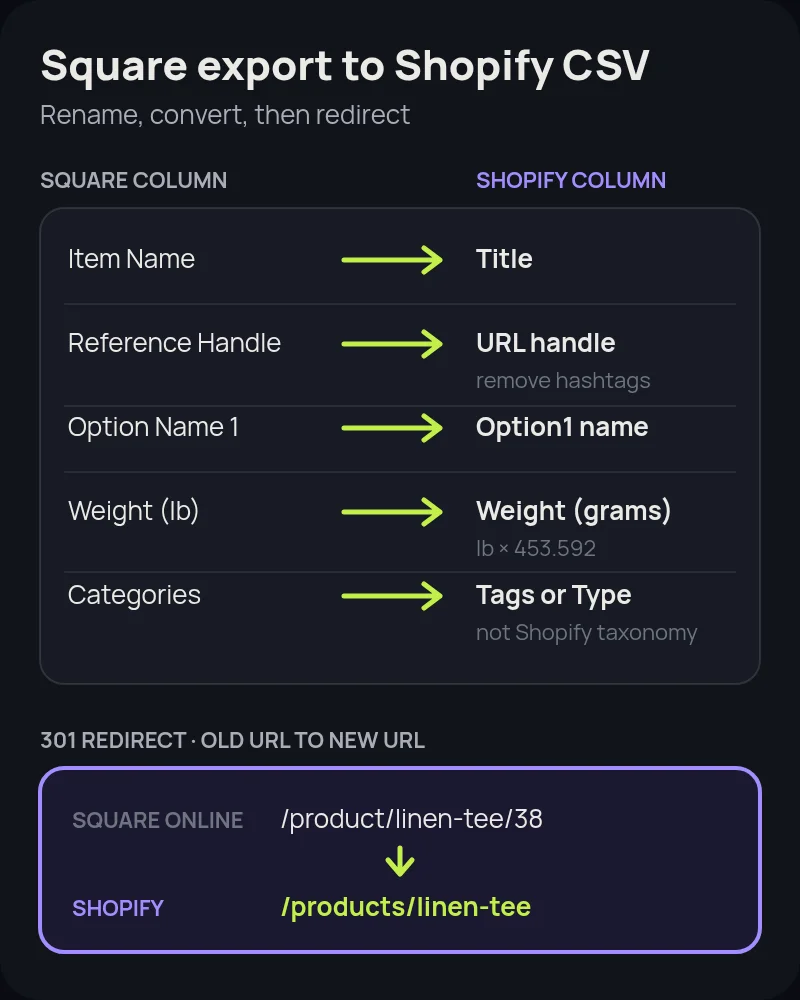
- Handles: use Square's Reference Handle or Permalink as the Shopify URL handle. Handles can only contain letters, numbers and dashes, so remove any hashtags.
- Names and options: Item Name becomes Title, Default Vendor Name becomes Vendor, and Option Name 1 to 3 and Option Value 1 to 3 become Option1 to Option3 name and value.
- Weights: Square exports kilograms or pounds, and Shopify wants grams. Multiply kilograms by 1,000 or pounds by 453.592.
- Categories: Square categories don't match Shopify's standard product taxonomy. Copy them into the Tags or Type column, and use them to build collections later.
- Unchanged: SKU and Price need no edits. SEO Title and SEO Description, and Default Unit Cost (which becomes Cost per item), only need renaming.
Delete any Square columns that aren't in that list before you import. For customers, there's no column mapping at import at all: the file has to match Shopify's customer template exactly. Rename Square's Email Subscription Status to Accepts Email Marketing and change Subscribed to yes and anything else to no. Add a Default Address Country Code column, which Square doesn't export, and watch for duplicate phone numbers, because Shopify skips those customers.
Protect your search traffic with redirects
Square Online product pages use addresses like /product/linen-tee/38, with the item name and a number, and the main shop page sits at /s/shop. On Shopify, products live at /products/linen-tee and categories become collections under /collections/. Every old address that has rankings or links needs a 301 redirect to its new page.
- List your URLs first. Export the pages that get traffic from Google Search Console, and crawl the old site before you switch.
- Create redirects before you move the domain. In Shopify, go to Content > Menus > View URL redirects, or import them all at once with a CSV.
- Disconnect the domain from Square first. Shopify warns that a domain still connected to your old platform can cause SSL certificate errors.
- On a free square.site address? Shopify redirects only work on domains connected to your Shopify store, so update the links on your social profiles, Google Business Profile and anywhere else you've shared the old address.
- Submit your new sitemap in Search Console once the store is live, and test your top old URLs by hand.
Our Shopify migration SEO checklist covers titles, structured data and post-launch monitoring in more detail.
Square to Shopify migration, step by step
- Decide your POS setup: move everything to Shopify POS, or keep Square in-store with an inventory sync.
- Export from Square: the item library CSV, the customer CSV, online orders, and a list of your page URLs.
- Import products and customers with the Store Migration app, or with CSVs edited to Shopify's templates.
- Check every product: prices, unit-priced items, variants, weights, images and inventory locations. Rebuild any item that had more than 3 options or 100 variations, then set products to active.
- Build what the import skips: collections from your old categories, navigation, About, shipping and returns pages, and store policies.
- Move reviews, orders and gift cards with apps, and ask Square Support about saved cards if you need them.
- Set up payments, shipping and taxes, then place test orders, including a refund.
- Create your redirects, disconnect the domain from Square, connect it to Shopify, and submit the sitemap.
- Set up Shopify POS or your inventory sync, and train staff before the switch.
- Cancel your Square paid plan only after the new store is live and orders are flowing.
Common mistakes to avoid
- Launching drafts. Products imported by the app stay hidden until you set them to active.
- Missing $0 prices. Unit-priced items and items with too many variations import at a price of $0. Search for them before launch.
- Forgetting weight units. Pounds left in a grams column throw off every shipping rate.
- Leaving the domain connected to Square. Disconnect it before you connect it to Shopify.
- Skipping redirects. Old
/product/links in Google and on social media will break without them. - Two catalogs, no sync. If you keep Square in-store, decide which system owns stock before launch.
How Startup Slang helps
We have moved brands to Shopify from Magento, WooCommerce, BigCommerce and Salesforce Commerce Cloud, and our Wix, Squarespace and Etsy guides cover moves from website builders and marketplaces. A Square move adds one more piece: your point of sale. Our Shopify migration team handles the data, redirects, theme, apps and in-store setup from our offices in Toronto and Montreal. If you're still choosing a platform, our Shopify agency team can help you pick a plan and a build approach.
Frequently asked questions
Can I migrate from Square to Shopify for free?
The tools are free: Shopify's Store Migration app costs nothing and imports products and customers from your Square CSV exports. You still need a Shopify plan. Shopify offers a 3-day free trial, then $1 a month for 3 months, and Basic is $29 a month billed yearly or $39 monthly after that.
Is Shopify cheaper than Square Online?
It depends on your plan. Square Free has no monthly fee but charges 3.3% + 30 cents per online card sale and doesn't let you connect your own domain. Square Plus adds a custom domain for $49 a month per location at 2.9% + 30 cents. Shopify Basic is $29 to $39 a month at the same 2.9% + 30 cents with Shopify Payments, with a custom domain included.
Can I keep using Square POS after moving my online store to Shopify?
Yes. Square's pricing page lists a Thrive Inventory integration that syncs your Square catalog and inventory with Shopify. Or you can move in-person sales to Shopify POS too. Shopify says some Square hardware might be compatible, so check its supported hardware list first.
Will my Square reviews move to Shopify?
No. Shopify's guide says reviews can't be exported or migrated from Square. You can add them to your new store by hand with a reviews app such as Judge.me, Loox or Yotpo.
Why did some of my Square items import at $0?
Shopify's Store Migration app imports items priced by unit at a price of 0, and items with more than 3 options or more than 100 variations import without variants and at a price of 0. Fix those products in the Shopify admin before you set them to active.
How do I keep my Google rankings when I leave Square Online?
Create 301 redirects in Shopify from each old Square Online address, such as /product/item-name/38, to its new /products/ page before you move your domain. Then submit your new sitemap in Google Search Console. Redirects only work on a domain connected to Shopify, so a free square.site address can't be redirected.
Can I move my Square order history to Shopify?
Yes, with a third-party app. Export online orders from your Square Online dashboard under Orders, then import them with an app such as Matrixify, LitExtension, EZ Importer or Cart2Cart. Shopify recommends only moving orders that are already fulfilled.