
Squarespace and Shopify both host your site, handle security and take card payments, so either one can run a small online store. The difference is what each was built for. Squarespace is a website builder known for its design, with commerce built in. Shopify is a commerce platform first, with a website attached. That shapes everything from the catalogue and checkout to the apps around them and how far each one can grow with you.
This comparison sticks to facts you can check. Prices, fees and limits come from Squarespace's pricing page, Shopify's pricing page and both help centres, checked on November 3, 2026. Prices are in US dollars unless noted. Both companies change pricing often, so confirm the numbers for your country before you sign up.
The short answer
- Choose Squarespace if the website is the product and the store is a side line. Think portfolios, studios, restaurants, creators and service businesses that sell a few products, bookings, courses or memberships.
- Choose Shopify if selling products is the business, and you expect more SKUs, more channels, wholesale buyers, selling abroad or a team working in the admin.
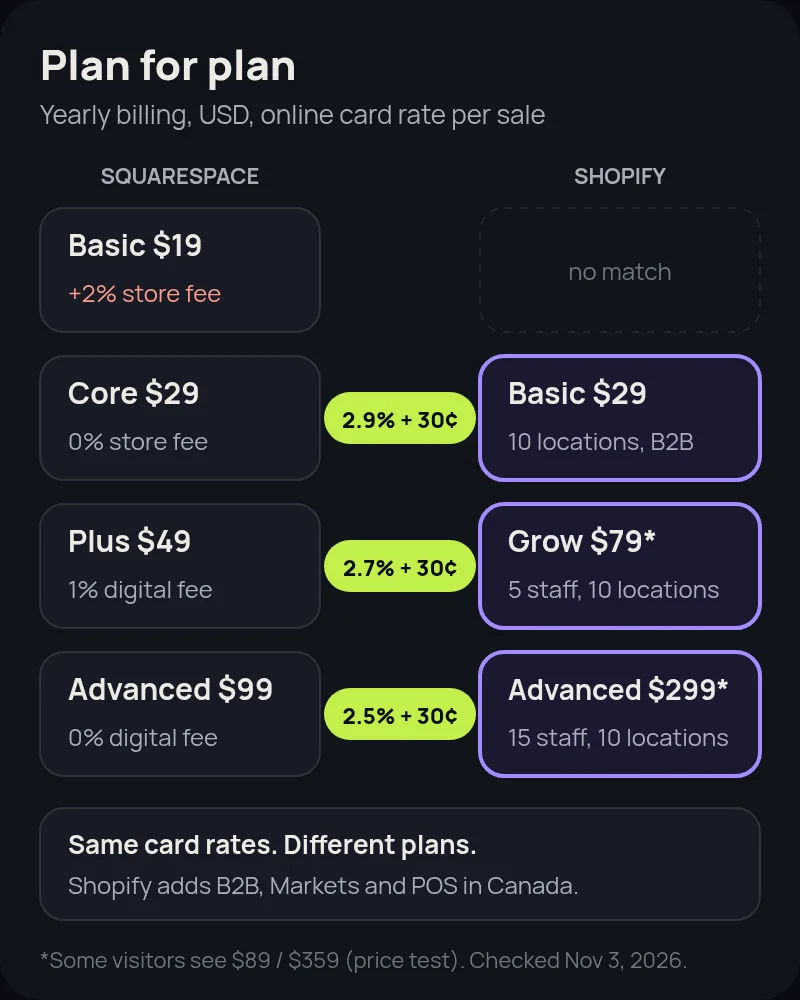
- At the entry level they cost the same. Squarespace Core and Shopify Basic are both US$29 a month on yearly billing, with the same 2.9% + 30¢ online card rate. Squarespace gets cheaper than Shopify at the higher tiers. Shopify gives you more commerce features for the money.
Pricing: Squarespace vs Shopify plans
Squarespace has four plans: Basic, Core, Plus and Advanced. Every paid plan can sell, and Squarespace says there's no limit on the number of products. Shopify also has four main plans: Basic, Grow, Advanced and Plus. All of them include unlimited products and the full online store.
| Tier | Squarespace (yearly / monthly billing) | Shopify (yearly / monthly billing) |
|---|---|---|
| Entry | Basic: $19 / $25 a month, plus a 2% online store transaction fee | Basic: $29 / $39 a month |
| Main | Core: $29 / $39 a month, 0% transaction fee | Grow: $79 / $105 a month (some visitors have seen $89 yearly since mid-October 2026) |
| Upper | Plus: $49 / $65 a month | Advanced: $299 / $399 a month (some visitors have seen $359 yearly) |
| Top | Advanced: $99 / $139 a month | Plus: from $2,300 a month |
| Free trial | 14 days, no credit card needed | 3 days free, then $1 a month for 3 months on most plans |
A few notes on the table. Since mid-October 2026, Shopify's yearly prices for Grow and Advanced have changed from one visit to the next, which looks like a price test, so check the live page. Canadian visitors see Shopify prices in Canadian dollars. When we checked on November 3 and 4, 2026, Basic showed as C$44 and then C$37 a month billed yearly, and C$49 billed monthly, so check the live page for your price. Squarespace's annual plans include a free custom domain for the first year. Shopify includes a free myshopify.com address, and you can connect a domain you already own.
Payment processing and transaction fees
For most stores, the monthly plan price matters less than what you pay on every order. Both platforms have their own payment service, and the online card rates match tier for tier:
| Fee | Squarespace | Shopify |
|---|---|---|
| Online card rate (own payments) | 2.9% + 30¢ on Basic and Core, 2.7% on Plus, 2.5% on Advanced (Squarespace Payments) | 2.9% + 30¢ on Basic, 2.7% on Grow, 2.5% on Advanced, 2.25% on Plus (Shopify Payments) |
| Platform transaction fee | 2% on Basic for online store sales; 0% on Core and up | None with Shopify Payments. With a third-party provider: 2% Basic, 1% Grow, 0.6% Advanced, 0.2% Plus |
| Other payment options | Stripe, PayPal, Apple Pay, Afterpay and Klarna | Shopify Payments, Shop Pay, PayPal and many third-party providers |
| Courses, memberships, digital content | 7% fee on Basic, 5% on Core, 1% on Plus, 0% on Advanced | Through apps; fees depend on the app |
| Automatic tax calculation | Core and up: 0.15% / 0.10% / 0.05% per transaction, max 99¢ | Shopify Tax: free up to $100,000 in sales, then 0.35% on US orders or 0.25% on Canadian orders (Basic to Advanced), max 99¢ per order |
The trade-off is simple. Skip Squarespace Basic if you sell physical products, because the 2% fee costs more than upgrading once you sell more than about $500 a month. On Shopify, use Shopify Payments where it's available, or the third-party transaction fee is added on top of what your payment provider charges. Shopify Payments works in Canada, and its Canadian in-person rates include a flat 15¢ Interac debit fee on most plans.
Products, variants and inventory
This is where the two platforms differ most, and it's usually what decides it for product-led brands:
- Variants. A Squarespace product can have up to six options and 250 variant combinations (Squarespace Help). A Shopify product can have up to three options but 2,048 variants (Shopify Help). Squarespace allows more option types, and Shopify allows far more combinations. A sofa in 4 sizes, 30 fabrics and 5 leg finishes makes 600 variants, which fits on Shopify but not on Squarespace.
- Bulk imports. Squarespace imports up to 10,000 products from a CSV on version 7.1 sites. Shopify's CSV import and bulk editor are built for big catalogues, and many apps sync products from suppliers and ERPs.
- Locations and staff. Shopify's Basic, Grow and Advanced plans track inventory across 10 locations, and Plus tracks up to 200. Staff accounts grow from 5 on Grow to 15 on Advanced, and Plus has no limit. Squarespace Basic allows 2 contributors, and the higher plans allow unlimited contributors.
- Wholesale. Shopify B2B is part of every plan, with up to 3 B2B catalogues (unlimited on Plus). Squarespace's plan comparison doesn't list wholesale price lists or B2B catalogues. Our Shopify B2B guide explains how this works.
Selling in Canada and abroad
Squarespace stores have one primary currency. With Squarespace Payments or Stripe, multi-currency checkout is on by default, so international shoppers can pay in their own currency at checkout while you're paid in yours. It isn't available if PayPal is your only processor, and it applies to one-time purchases, invoices, pay links and donations rather than subscriptions (Squarespace Help). Canadian bank accounts can only use CAD or USD as the store currency.
Shopify handles this with Markets. You set up countries or regions with their own currency, pricing, language and domain, all from one store. For Canadian brands selling into the US, that usually means one store with a Canadian market and a US market, rather than two separate sites.
In-person selling is another gap. Squarespace says its point of sale works through the Squarespace app in the US only. Shopify POS works in Canada, either on a phone or with Shopify's card readers, and every plan includes it. Stores that need advanced retail features can add POS Pro for each location.
Design, content and blogging
Squarespace is the stronger content tool. Its templates and drag-and-drop editor make it easy to build a polished site without a developer, its blog is excellent, and it has built-in tools for email campaigns, member areas, courses, invoices and appointment scheduling. If your site is mainly a portfolio, a blog or a booking system, Squarespace does more of that out of the box.
Shopify's online store editor has caught up a lot, and its themes are built around selling: collections, filters, product pages and a fast checkout. Its blog does the basics, but it's simpler than Squarespace's. Content-heavy brands on Shopify often add a page builder or metaobjects, or run a headless Shopify front end when content and commerce both need to be first-class.
Apps, integrations and checkout
- Squarespace keeps a short, curated list of third-party Extensions for things like sales tax, dropshipping, SEO and social media marketing. Custom code and Commerce APIs are available from the Core plan up.
- Shopify has an App Store with thousands of apps for subscriptions, reviews, loyalty, bundles, ERPs and 3PLs. Most commerce software builds for Shopify first, and Shopify's own apps, such as Shopify Subscriptions, Flow and Shopify Email, cover a lot without extra fees. See our Shopify Flow guide for what automation can do.
- Checkout. Squarespace offers checkout on your own domain, express checkout and abandoned-cart emails on every plan. Shopify's checkout comes with Shop Pay, and Shopify says it converts 15% better on average than other platforms (that's Shopify's own figure). Full checkout customization needs Shopify Plus.
Which should you choose, and when to switch
Start with what makes you money. If most revenue comes from services, bookings, memberships or content, and products are a small extra, Squarespace Core is a fair, low-cost choice. It's also the cheaper option at the higher tiers. If most revenue comes from products, and you're planning more SKUs, wholesale, a US expansion, retail or a bigger team, start on Shopify. Moving later costs more than starting there.
Moving later is manageable, though. Squarespace's product export leaves out images and alt text, its blog export can't be imported into Shopify, and nearly every URL changes. Our Squarespace to Shopify migration guide covers the CSV reshaping, the content rebuild and the redirect map step by step. The same trade-offs come up in our Shopify vs Wix, Shopify vs WooCommerce and Shopify vs BigCommerce comparisons.
How Startup Slang helps
Startup Slang has built and migrated Shopify stores since 2017, from our offices in Toronto and Montreal. If you're choosing a platform, our Shopify agency team will review your catalogue, channels and growth plans and tell you honestly whether Shopify is worth it yet. If you're already on Squarespace and outgrowing it, our Shopify migration team handles the data, design, content and redirects, so you keep your rankings.
Frequently asked questions
Is Shopify or Squarespace better for e-commerce?
For product-led stores, Shopify. It allows up to 2,048 variants per product, multi-location inventory, B2B catalogues on every plan, Markets for selling abroad, POS in Canada and thousands of apps. Squarespace is better when the website, content or bookings come first and the store is a smaller part of the business.
Is Squarespace cheaper than Shopify?
At the entry level they match: Squarespace Core and Shopify Basic are both US$29 a month on yearly billing, with the same 2.9% + 30¢ online card rate. At higher tiers Squarespace is cheaper (Plus $49 and Advanced $99 versus Shopify Grow $79 and Advanced $299 on yearly billing), but Shopify's plans include more commerce features.
Does Squarespace charge transaction fees?
Only on the Basic plan, which adds a 2% fee on online store sales. Core, Plus and Advanced have a 0% online store transaction fee. Card processing fees still apply on every plan, and courses, memberships and digital content carry their own fee of 7%, 5%, 1% or 0% depending on the plan.
Does Shopify charge transaction fees?
Not if you use Shopify Payments, where you pay only the card rate. If you use a third-party payment provider, Shopify adds 2% on Basic, 1% on Grow, 0.6% on Advanced or 0.2% on Plus.
How many variants can a product have on Squarespace vs Shopify?
Squarespace allows up to six options and 250 variant combinations per product. Shopify allows up to three options and 2,048 variants per product. Squarespace allows more option types, while Shopify allows many more combinations.
Can I sell in Canada and the US from one store?
Yes, on both, with differences. Squarespace has one store currency, and its multi-currency checkout lets shoppers pay in their own currency at checkout. Shopify Markets lets one store run separate markets with their own currency, pricing, language and domain. Squarespace's point of sale is US-only, while Shopify POS works in Canada.
Can I move from Squarespace to Shopify later?
Yes, but it takes work. Squarespace's product export leaves out images and alt text, its blog export can't be imported into Shopify, and most URLs change, so you need a redirect map. Our Squarespace to Shopify migration guide covers each step.