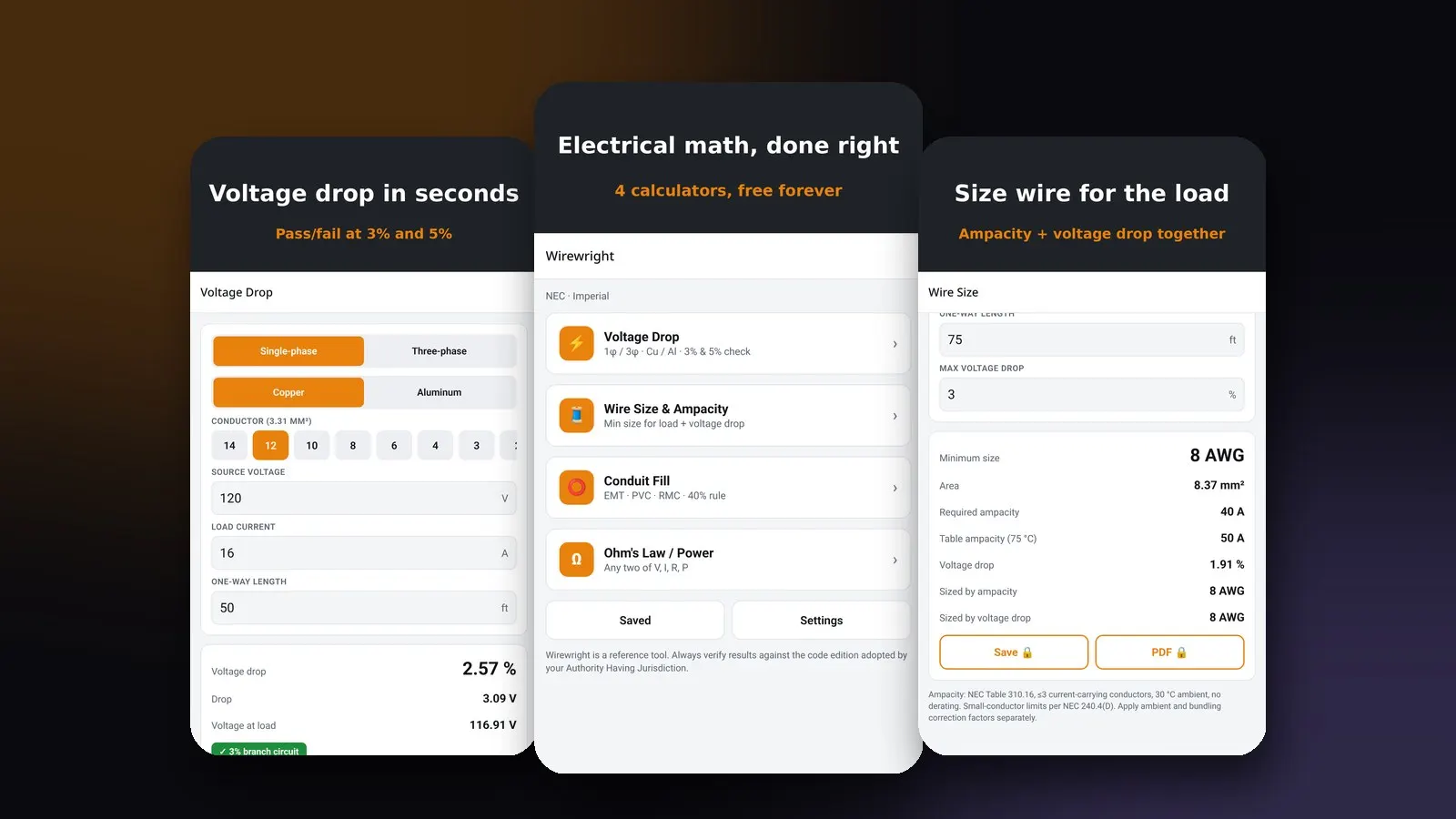
Every electrician carries a few calculations around in their head, and a few more that are easier to check on a phone. How much voltage will this run lose? What is the smallest conductor that carries the load? Will these wires fit in this conduit? An electrician calculator app should answer those questions in seconds, show its working, and tell you which code table it used.
This guide covers what a good electrical calculator app should do, the four calculations most electricians reach for, and what we learned designing and building Wirewright, an electrician calculator for the NEC and CEC. You can read the full project story in our Wirewright case study.
What an electrician calculator app should do
A calculator on the job site is used in poor light, with gloves on, often with no signal. That changes what "good" means. In our view a good electrician calculator app needs to be:
- Fast. The common calculations should be one tap from the home screen, with sensible defaults already filled in.
- Transparent. Every result should name the code table or rule behind it, so you can check it and explain it to an inspector or a client.
- Code-aware. Electricians in the US work to the National Electrical Code (NEC), and electricians in Canada work to the Canadian Electrical Code (CEC). An app used on both sides of the border has to switch between them, and between imperial and metric units.
- Offline. Basements, new builds and rural sites often have no signal. The math has to run on the phone.
- Private and uncluttered. No account to create, no ads covering the input fields, no tracking.
Those principles shaped every screen in Wirewright.
The four calculations electricians use most
Voltage drop
Voltage drop is the voltage lost along a conductor because of its resistance. On long runs it can leave equipment underpowered, so it is one of the most common checks electricians make. A voltage drop calculator needs the phase (single or three phase), the conductor material (copper or aluminum), the conductor size, the source voltage, the load current and the one-way length of the run.
The NEC's informational notes recommend keeping voltage drop to about 3% on a branch circuit or feeder and 5% in total. These are recommendations rather than strict requirements, but they are the numbers most designers and inspectors work to. Wirewright shows a clear pass or fail against those limits and, when a run fails, tells you the smallest conductor that would pass.
On wirewrightapp.com the free web version of the voltage drop calculator uses resistance values from NEC Chapter 9, Table 8 and cites them under the result.
Wire size and ampacity
Choosing a conductor size means satisfying two constraints at once: the wire must carry the load safely (ampacity), and the run must keep voltage drop within your target. A good wire size calculator checks both and returns the larger of the two answers.
Wirewright's wire size calculator applies the 125% rule for continuous loads, checks ampacity against the NEC 310.16 table, respects the small-conductor limits in 240.4(D), and then checks voltage drop against the maximum you set. The result screen shows the size required by ampacity, the size required by voltage drop and the final recommendation, so you can see which constraint decided the answer.
Conduit fill
Conduit fill limits how much of a conduit's cross-section conductors may occupy, so the wires can be pulled without damage and heat can escape. The familiar limits are 53% for one conductor, 31% for two and 40% for three or more.
Wirewright's conduit fill calculator covers EMT, PVC Schedule 40 and RMC and applies the right limit automatically based on how many conductors you add. That turns a page of table lookups into a few taps.
Ohm's law and power
Ohm's law ties together voltage, current and resistance, and the power formula adds watts. Enter any two values and Wirewright solves for the rest. It is the simplest calculator in the app and probably the one apprentices open most.
NEC or CEC, imperial or metric
Many electrical calculators quietly assume the US code and imperial units. That is a problem for Canadian electricians and for contractors who work in both countries. Wirewright lets you switch between NEC and CEC tables and between imperial and metric units in Settings, and the result screens label which code and units are in use.
Whatever app you use, the code edition adopted by your local authority having jurisdiction is what counts. Treat any calculator as a planning tool and verify the result against the adopted code.
Free web calculators vs. a native app
Web calculators are great for a quick check at a desk, and they are easy to share. The Wirewright site offers free web versions of the core calculators, each with the formula, worked examples and the code references behind it.
A native app adds what the web cannot do as well on site:
- It works fully offline.
- It remembers your settings, such as NEC or CEC and imperial or metric.
- It can save calculations to a job history and export a PDF report for an inspector or a client. In Wirewright those two features are part of an optional Pro subscription; all four calculators stay free.
That split between free web tools and an app with extra convenience features is a pattern we recommend to many product teams. The web pages are what people find through search, and the app is what they keep.
How we designed and built Wirewright
Wirewright is a product designed and developed by Startup Slang, end to end. Here is how we approached it.
Start with a tested calculation engine
The most important part of an engineering calculator is the math, so we built it first and kept it separate from the interface. Wirewright's calculations live in a pure TypeScript library with its own automated tests. That makes the results easy to verify and lets the same engine power the iPhone app, the Android app and the web.
One codebase for iOS and Android
We built the app with Expo and React Native, which let us ship to iPhone and Android from a single TypeScript codebase. For a focused utility app that is a big saving in time and cost compared with two separate native apps, without giving up a native feel.
Design for one hand and bright sunlight
Every calculator starts with sensible defaults, inputs are large, and results are big and high-contrast with a clear pass or fail. The home screen is a short list of the four calculators so nothing is more than one tap away.
Private by default
Wirewright has no account, no ads and no tracking, and every calculation runs on the device. Building it this way kept the app simple and makes it easier to trust.
Search-first website
We built wirewrightapp.com around the questions electricians actually search for, such as how to calculate voltage drop or what size wire a load needs. Each calculator page has a working tool, the formula, examples and code citations, with structured data so search engines understand the content. That gives the app a way to be discovered long before anyone opens an app store.
Choosing an electrician calculator app: a checklist
Whichever app you pick, check these points before relying on it:
- Does it show which code table or rule it used for each result?
- Does it support your code (NEC or CEC) and your units?
- Does it work offline?
- Does it check both ampacity and voltage drop when sizing wire?
- Does it apply the continuous-load rule where it should?
- Can you save or export results when you need a record?
- Is it free of ads and account walls on the screens you use most?
Wirewright was built to answer yes to every one of those. You can try the free calculators at wirewrightapp.com, and the iPhone and Android apps are being prepared for the App Store and Google Play.
Building an app for your trade or industry
Wirewright started from a simple idea: take the calculations a trade does every day and make them fast, clear and trustworthy. The same approach works for many industries, from field service and construction to health and logistics.
If you have an app idea, Startup Slang can take it from product design to a store-ready build, with a website built to be found. See our mobile app development services, read the Wirewright case study, or see how we built Glidedose, a private GLP-1 tracker app.
Frequently asked questions
What is the best electrician calculator app?
Look for an app that covers voltage drop, wire size, conduit fill and Ohm's law, names the code table behind each result, supports NEC or CEC, and works offline. Wirewright was built by Startup Slang to do all of that.
Does Wirewright work with the Canadian Electrical Code?
Yes. You can switch between NEC and CEC tables, and between imperial and metric units, in Settings.
Is Wirewright free?
All four calculators are free. An optional Pro subscription adds saved calculations, job history and PDF export.
Can I use Wirewright without signal?
Yes. The app runs every calculation on your device, so it works offline on the job site.
Who built Wirewright?
Wirewright was designed and developed by Startup Slang, an AI-first marketing and development agency in Toronto and Montreal. Read the case study.